
2D Car Parking
Play Count0
Published2020-01-14
Supported DevicesPC
CategoryArcade & Classic
Rating★★★★★5.0Rate this game
📝2D Car Parking Overview
Can you squeeze into the spot without scratching the paint? 2D Car Parking turns every park job into a nail-biter.
💬What is 2D Car Parking?
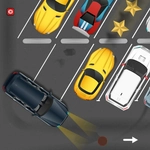
You know that moment when you're backing into a spot and the rear bumper is inches from a wall? That's every second of 2D Car Parking. It strips parking down to its purest form: a flat, top-down car, a painted rectangle, and your ability to steer without overcorrecting into a lamppost.
The controls are dead simple—WASD moves the car, nothing else—but the game quietly ramps up the pressure. Early levels give you a wide-open space, almost insulting. Then come the angled spots, the narrow alleys, the cars parked way too close on both sides. I found myself holding my breath on a reverse parallel park, trying to feather the S key so the car inches back instead of lurching. There's no timer most of the time, so the pressure is self-inflicted: you'll restart a level not because you failed, but because your parking job was ugly.
If you grew up playing those old top-down driving games, this scratches that itch. It's not about speed or stunts—it's about precision, patience, and learning the car's turning radius by heart. The lack of fancy graphics or physics gimmicks works in its favor; everything feels consistent, so when you mess up, you know it was your fault. I kept coming back to shave a few seconds off my clean runs. For a quick five-minute break or a forty-minute obsession, it does exactly what it promises.
👥How to Play 2D Car Parking
WASD to control car
✨Game Tips
Use small taps on the keys instead of holding them down—the car turns sharper than you think.
Reverse into spots whenever possible; it gives you a tighter turning circle.
Watch the car's front wheels, not the bumper, to judge your angle.
If you clip a barrier, don't try to power through—back up and straighten out.
Take your time: no timer means slow is smooth and smooth is fast.
Practice a perfect 90-degree turn into a spot before tackling the diagonal ones.
🔧FAQ
Q: Is 2D Car Parking free to play?
A: Yes, it runs free in your browser with no paywalls.
Q: Can I play 2D Car Parking on mobile?
A: It works on phones, but keyboard controls are recommended for precision.
Q: Do I need to download anything to play 2D Car Parking?
A: No downloads needed—just open the page and start driving.
Q: How do I control the car in 2D Car Parking?
A: Use WASD keys: W to accelerate, S to brake/reverse, A and D to steer.
Q: Does 2D Car Parking have multiplayer?
A: No, it's a single-player arcade challenge.
Q: Will my progress be saved in 2D Car Parking?
A: The browser version resets when you close the tab, so finish levels in one session.