
3D Formula Racing: Pro Edition
Play Count0
Published2026-05-11
Supported DevicesPC + Mobile
CategoryAction & Fighting
Rating★★★★★5.0Rate this game
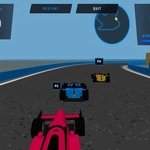
📝3D Formula Racing: Pro Edition Overview
Grab the wheel and hit the nitro for split-screen formula battles where one wrong turn costs you the podium.
💬What is 3D Formula Racing: Pro Edition?
The second player sits shoulder to shoulder with you, both hunched over the same keyboard, and the screen splits down the middle. That's the whole appeal of 3D Formula Racing: Pro Edition—local head-to-head without needing two machines. You'll mash W and arrow keys, accidentally hit each other's hands once or twice, and then settle into a rhythm. The cars respond fast; too fast if you're used to arcade racers. Brake before the corner, not during it, or you'll watch your rear wing slide into the barrier. Nitro is the great equalizer: save it for the long straights and overtake at the last second.
I kept coming back to the first circuit because it has a nasty chicane right after a downhill section. You think you can take it flat out, and for about half a second you're flying, then the rear tires lose grip and you're pointing the wrong way. The AI (if you're solo) doesn't make that mistake, so you learn to lift off early. Against a human, mind games matter more than raw speed. I'd fake left, force my opponent to cover the inside, then dive right and use their braking zone as a screen. It's simple, but it works.
On mobile, touch controls make it playable but a bit less precise—great for quick races on the bus, though the split-screen option is really meant for desktop. The 3D visuals are clean, not flashy, and the sense of speed is real, especially with nitro burning. If you like formula cars and friendly trash talk, this one's worth a few laps.
👥How to Play 3D Formula Racing: Pro Edition
Game Controls
For PC (Keyboard):
Player 1:
W, A, S, D - Accelerate, Steer Left/Right, and Brake
Left Shift - Nitro (NOS) Boost
Player 2 (Split-Screen Mode):
Arrow Keys - Accelerate, Steer Left/Right, and Brake
Enter - Nitro (NOS) Boost
For Mobile (Touch S
✨Game Tips
Save nitro for the final straight; using it mid-corner just sends you into the wall.
In split-screen, agree on hand positions before starting or you'll both reach for the same keys.
Brake hard before hairpins, then ease back on the gas as you straighten out.
Learn the AI's braking points by following it for a lap, then outbrake it on lap two.
On mobile, tap the screen lightly—overshooting steering is the quickest way to spin.
If you're behind, don't fight for every corner; wait for the straight and draft before boosting.
🔧FAQ
Q: Is 3D Formula Racing: Pro Edition free to play?
A: Yes, it's completely free in your browser—no paywalls or hidden charges.
Q: Can I play on mobile?
A: Yes, the game supports touch controls, though split-screen works best on a desktop keyboard.
Q: Do I need to download anything?
A: No downloads. It runs directly in your browser as an HTML5 game.
Q: How do I activate nitro?
A: Player 1 presses Left Shift, Player 2 presses Enter (or use the touch nitro button on mobile).
Q: Can two people play on the same computer?
A: Yes, it has split-screen mode. Player 1 uses WASD, Player 2 uses arrow keys.
Q: Is there a single-player mode against AI?
A: Yes, you can race solo against computer opponents when you don't have a second player.