
Arcade Breakout
Play Count0
Published2025-11-25
Supported DevicesPC + Mobile
CategoryArcade & Classic
Rating★★★★★5.0Rate this game
📝Arcade Breakout Overview
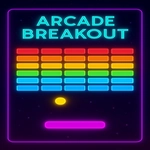
Smash glowing bricks and keep the ball alive as the speed climbs — can you clear the screen without losing all your lives?
💬What is Arcade Breakout?
I'll be honest: I've lost entire evenings to games like this. Arcade Breakout doesn't try to reinvent the wheel — it just nails the classic paddle-and-ball loop with slick neon visuals and a difficulty curve that hooks you hard. You drag your mouse side to side (or swipe on a phone) to keep that little white ball in play. Miss it, and a life disappears. The first few levels feel almost too easy, but then the ball speeds up, the bricks start moving, and suddenly your palm is sweating.
One thing I really like is the feedback. When the ball smacks into a brick, there's a satisfying little pop, and the brick shatters into particles. If you catch the ball on the edge of your paddle, it angles off at a sharp diagonal — that's how you reach the stubborn bricks tucked in the corners. I found myself deliberately aiming for those edge hits to clear the last few blocks, and it's a small mechanic that makes a big difference. There are power-ups too, like multi-ball and paddle stretch, but they're not handed to you; you have to earn them by hitting specific bricks.
Don't expect a story or cinematic cutscenes. This is pure reflex and rhythm. After about level 10 the ball moves fast enough that you're reacting on instinct, not thinking. It's the kind of game you open for a quick 5-minute break and then realize 45 minutes vanished. Perfect for the classroom or office when you need a jolt of focus without loading up a heavy game.
👥How to Play Arcade Breakout
Controls:
Mouse:
Move Paddle: Drag your mouse horizontally across the screen to control the paddles movement.
Touch (Phones/Tablets):
Move Paddle: Swipe or drag your finger horizontally across the screen to control the paddles movement.
Keyboard:
Move Pad
✨Game Tips
Aim for the paddle edges to send the ball into steep angles — that's your ticket to clearing corner bricks.
Let the ball come to you. Chasing it across the screen usually ends in overshooting.
Prioritize multi-ball power-ups early; they clear bricks twice as fast but demand more focus.
Watch the ball's shadow or trail to judge its landing spot when the speed kicks up.
If you're on mouse, keep your wrist anchored to reduce jittery movements.
🔧FAQ
Q: Is Arcade Breakout free to play?
A: Yes, it's completely free. No paywalls or hidden fees — just open and play.
Q: Can I play Arcade Breakout on my phone?
A: Absolutely. Touch controls work great; just swipe left or right to move the paddle.
Q: Do I need to download any software?
A: No download needed. It runs right in your browser as an HTML5 game.
Q: What if the ball slips past my paddle often?
A: Try keeping your paddle slightly in front of the ball's direction rather than directly under it.
Q: Are there multiple levels or just one screen?
A: There are many levels with increasing speed and brick layouts. Each new screen brings a new pattern.
Q: Does Arcade Breakout have keyboard controls?
A: Yes, you can use the left and right arrow keys to move the paddle if you prefer playing on a keyboard.