
Army War CS
Play Count0
Published2019-10-29
Supported DevicesPC
CategoryAction & Fighting
Rating★★★★★5.0Rate this game
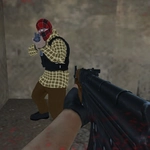
📝Army War CS Overview
Lock and load for 15 levels of tactical shooting where every corner hides an enemy and every bullet counts—can you clear the map?
💬What is Army War CS?
Army War CS plays like a stripped-down Counter-Strike campaign. You’re dropped into enemy territory with a rifle, a sidearm, and a handful of grenades, and the objective is simple: clear all hostiles across 15 increasingly nasty levels. The first thing I noticed is how much the right-click aim matters—hip fire sprays everywhere, but a quick right-click steadies your shots enough to land headshots. Left Shift to sprint feels great for repositioning, and Ctrl to crouch behind cover saved my virtual skin more times than I can count.
The enemy AI isn't brilliant, but it's aggressive enough to punish you for peeking the same corner twice. I kept getting flanked on level 7 because I was too greedy with the rifle. Swapping to the shotgun (or whatever you've unlocked) changes the tempo entirely. The grenade key G is your best friend for rooms with multiple shooters—toss one, wait for the boom, then push. Just don't cook it too long; I blew myself up twice before I learned the timing.
Each level unlocks new weapons, which gives you a reason to push forward even when the difficulty spikes. The pause with Tab is oddly useful for catching your breath mid-firefight. It won't replace a full tactical shooter, but for a browser game it's surprisingly tight. If you like quick FPS missions with no fluff, this will scratch that itch.
👥How to Play Army War CS
Controls:
• WASD or Arrow keys: move
• Left mouse button: fire
• Right mouse button: aim
• Space bar: jump
• Tab: pause
• Ctrl: crouch
• Left Shift: Run
• G: throw grenade
Features
• 15 levels
• Multiple weapons
• Amazi
✨Game Tips
Use right-click aim before firing; hipfire is wasted ammo at range.
Sprint with Left Shift between cover, not across open ground.
Save grenades for groups—one well-placed G clears a room faster than emptying a mag.
Crouch behind crates with Ctrl to reduce your hitbox while reloading.
Tap Tab when overwhelmed to pause and plan your next move.
Prioritize weapons you unlock; later rifles handle much better than the starting gun.
🔧FAQ
Q: Is Army War CS free to play?
A: Yes, it's completely free in your browser. No payment or subscription is required.
Q: Can I play Army War CS on mobile?
A: The game is designed for keyboard and mouse, so mobile isn't recommended. A desktop browser works best.
Q: Do I need to download or install anything?
A: No downloads needed. It runs on HTML5 and plays directly from your browser once the page loads.
Q: Does Army War CS have multiplayer?
A: No, it's a single-player campaign with 15 levels. You fight AI enemies, not other players.
Q: How do I aim down sights?
A: Hold the right mouse button to aim. This steadies your shots and greatly improves accuracy.
Q: What's the best way to deal with groups of enemies?
A: Throw a grenade with the G key. One good grenade can clear a tight group before you enter.