
Axe Castle
Play Count0
Published2023-03-21
Supported DevicesPC
CategoryAction & Fighting
Rating★★★★★5.0Rate this game
📝Axe Castle Overview
Lob an axe over the battlements and pray the other guy flinches first—that's Axe Castle in one brutal, satisfying sentence.
💬What is Axe Castle?
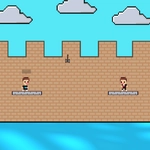
Two fighters stand on opposite towers. Each has a stack of axes, a shield arm, and exactly one goal: be the last one standing. Axe Castle keeps it refreshingly simple—you throw axes by holding a button to charge, release to send the blade spinning across the gap. A direct hit knocks your opponent back; a perfect hit might send them flying into the moat. It’s equal parts timing, prediction, and the occasional lucky bounce off the castle wall.
I tried the single-player mode first, expecting a dumb AI. I was wrong. The computer reads your patterns fast—if you always throw high, it will sidestep and punish you with a low arc. You learn to mix up your release points and fake a charge to bait a shield raise. My favorite cheap trick: hold the throw button just long enough to make the CPU commit, then release early for a quick chip shot. It almost feels unfair. Almost.
The two-player mode is where the real competition lives. Player 1 uses the W key, Player 2 uses the up arrow. Both hold to charge, and the first to flinch loses. With a friend on the same keyboard, it turns into a frantic mind game—do you keep charging for more power, or release now while they’re still thinking? I’ve never seen two people get so loud over pixelated axes. If you’re alone, the CPU is a solid sparring partner, but nothing beats the couch-versus-couch energy of a human opponent.
👥How to Play Axe Castle
The game consists of two-player and single-player modes. In two player mode, you shoot by holding down the p2(up) key and the p1(W) key.
✨Game Tips
Hold the charge button longer for a faster, harder throw—but don't overcharge or your aim gets shaky.
Against the CPU, alternate high and low arcs; it adapts to repetition faster than you'd expect.
In two-player, fake a full charge, release at 70%, and watch your friend's shield drop too early.
Aim for the edge of the tower, not center mass—ricochets can hit when a direct throw misses.
If you're losing, bait the opponent by standing still; most players overthink and throw too soon.
🔧FAQ
Q: Is Axe Castle free to play?
A: Yes, it runs in your browser at no cost. No hidden fees or premium tiers—just open and throw.
Q: Can I play Axe Castle on my phone?
A: The game is designed for keyboard controls, so mobile play is limited. Use a desktop or laptop for the best experience.
Q: Do I need to download or install anything?
A: No downloads required. Axe Castle runs directly in any modern web browser with HTML5 support.
Q: What are the controls for two-player mode?
A: Player 1 holds W to charge and throw. Player 2 holds the up arrow key. Release to launch your axe.
Q: Is there a single-player option?
A: Yes, you can battle against the computer in single-player mode. The AI opponent gets tougher as you win.
Q: Can I play Axe Castle on a school Chromebook?
A: As long as the site is accessible, it should work on any device with a keyboard and a browser.