
Baby First Words
Play Count0
Published2022-08-23
Supported DevicesPC + Mobile
CategoryFun & Crazy
Rating★★★★★5.0Rate this game
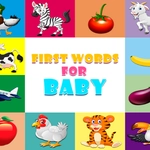
📝Baby First Words Overview
Press the sound button on a smiling cow and listen as 'moo' bursts out in a bright, cheery voice—your baby will be hooked after the first tap.
💬What is Baby First Words?
Ever tried to get a one-year-old to focus on anything for more than ten seconds? Good luck. But Baby First Words has this weird magic. You pick one of several cute characters—a cow, a cat, a duck, maybe a happy little frog—and then tap the big speaker button. The game says the word out loud, clear and cheerful, with a matching picture right there. No score, no timer, no way to lose. Just a cozy little loop of sounds and smiles.
The first time I played it with my nephew, he slapped the screen and made the cow moo about fifteen times in a row. He was laughing so hard his mom had to take a video. That's the whole point. The controls are deliberately dumb-simple: one tap on the character, one tap on the sound button. Repeat as many times as you want. Switch characters whenever the mood strikes. The art is bright and rounded, not flashy, which means it doesn't overstimulate—a real plus for toddlers. And because it runs right in your browser, there's zero setup.
I'll admit I found myself tapping the cat just to hear its meow, which is strangely satisfying even as an adult. The words are basic first-language stuff: animal sounds, simple object names, maybe a few greetings. It's not trying to teach reading or spelling; it's about making the connection between a picture and a sound. For parents or older siblings playing alongside, that's exactly what you want. No ads popping up, no 'level failed' nonsense. Just tap, hear, repeat. If you've got a baby who's starting to babble, this is a gentle little tool that feels more like play than homework.
👥How to Play Baby First Words
Select the character and touch the sound button so that the baby learns to say the word.
✨Game Tips
Let your baby mash the screen—there's no wrong button to press.
Repeat each character several times before switching; kids learn through repetition.
Use a touchscreen device if possible, since tapping feels more direct than a mouse.
Turn the volume up and say the words along with the game for extra engagement.
Try all the characters to see which one grabs your child's attention first.
🔧FAQ
Q: Is Baby First Words free to play?
A: Yes, it runs free in any modern web browser with no download or sign-up needed.
Q: Can I play Baby First Words on mobile?
A: Absolutely—it works on phones and tablets using just the touchscreen taps.
Q: Do I need to download anything to start?
A: No download required; just open the game page and the sound works immediately.
Q: What age is Baby First Words best for?
A: It's designed for babies and toddlers roughly 6 months to 3 years old, but anyone can enjoy it.
Q: Does the game need sound to work?
A: Yes, sound is essential because the whole point is hearing words and animal noises clearly.
Q: Is there a way to lose or make mistakes?
A: Not at all—there are no wrong moves, timers, or fail states, so it's stress-free for little ones.