
BLOCK FUSION
Play Count0
Published2026-04-03
Supported DevicesPC
CategoryPuzzle & Thinking
Rating★★★★★5.0Rate this game
📝BLOCK FUSION Overview
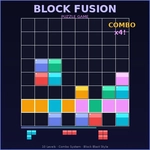
Drag three blocks at a time, clear rows and columns, and set up chain combos that turn tiny placements into massive scores.
💬What is BLOCK FUSION?
Three blocks show up at the bottom. That's your entire hand. No waiting for one perfect long piece—you're forced to place all three before the tray refreshes, which means every turn is a tiny puzzle about order and placement. I love how that small constraint changes everything. You'll drag a block onto the grid, then realize another block would've fit better in that corner, and suddenly you're arguing with yourself about whether to undo or just roll with it.
Rows and columns both clear. Not just rows like Tetris. That opens up satisfying vertical plays—stack a column high, drop the last block, and watch the whole thing vanish while a 'COMBO x2' pops up. Chain clears multiply your score fast. But here's the catch: the tray doesn't refill until all three pieces are gone, so if you leave a useless shape sitting there, you're stuck with it until you place all three. That's where the real tension lives.
The early grids feel almost too easy, but by the time the board starts filling and you're down to two awkward blocks, every placement counts. I once set up a double row+column clear with a single block—pure dopamine. The visuals are clean and minimal, no clutter, and the sound effects give that little 'thunk' when pieces lock. It's one of those games you open for five minutes and then look up realizing an hour vanished. If you like block puzzles that respect your time but punish lazy placement, this is worth keeping in a tab.
👥How to Play BLOCK FUSION
Drag blocks from the tray to the grid, or press 1-2-3 to select a piece then click the grid to place. Fill complete rows or columns to clear them. Chain clears for combo multipliers! All 3 pieces must be placed before new ones appear.
✨Game Tips
- Use the 1-2-3 keys to select pieces fast—dragging is fine, but keys save seconds when the grid gets messy.
- Always place all three pieces before you start dreaming about combos; the tray won't refresh until they're all placed.
- Leave a vertical gap open for those long straight blocks—column clears feel way better than row clears.
- Try to set up a row and a column to clear at the same time; the multiplier stacks quickly.
- Don't hoard a piece for too long; three pieces is all you get, so if one doesn't fit, place it in a low-risk spot.
- Watch the edges—corner blocks are harder to clear if you fill them in early.
🔧FAQ
Q: Is Block Fusion free to play?
A: Yes, Block Fusion is completely free online. No hidden fees or paywalls.
Q: Can I play Block Fusion on mobile?
A: Yes, the game works on mobile browsers. Use touch to drag blocks onto the grid.
Q: Do I need to download anything to play Block Fusion?
A: No download needed. It runs directly in your browser as an HTML5 game.
Q: How do I select a block without dragging?
A: Press the 1, 2, or 3 key to select a piece, then click the grid to place it.
Q: What happens if I can't fit all three blocks?
A: You must place all three pieces before the tray refills, so plan carefully to avoid dead ends.
Q: Does Block Fusion have combo multipliers for chained clears?
A: Yes, clearing multiple rows or columns in sequence triggers combo multipliers that boost your score.