
Block Toggle
Play Count0
Published2021-10-18
Supported DevicesPC + Mobile
CategoryPuzzle & Thinking
Rating★★★★★5.0Rate this game
📝Block Toggle Overview
Flip the right blocks at the right moment or watch your path crumble beneath you in this devious spatial puzzle.
💬What is Block Toggle?
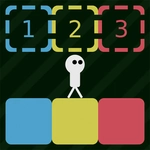
You're three steps from the exit when the floor vanishes. Classic Block Toggle move. You'll guide a small block through a grid where certain tiles can be switched between solid and empty states using the number keys or mouse buttons. Sounds simple—then you realize one wrong flip can delete the only bridge back.
The controls give you just enough rope: WASD or arrows slide you around, 1/2/3 (or left/right click) toggle blocks, and R resets the level instantly. That reset key becomes your best friend. I had a run where I flipped a block two tiles ahead, walked forward, then turned around to find my return path gone. No way back except restart. That's the kind of tension the game loves.
What keeps me coming back is how the puzzles teach you to think in layers. You can't just rush—you need to eyeball which blocks might be linked, which ones serve as anchors, and whether flipping a distant tile affects your current position. It starts mellow, but later levels demand two or three moves of foresight. This one scratches an itch most puzzle games ignore: consequences you can actually see.
👥How to Play Block Toggle
Menu Select: Enter or Space
Move: WASD or Arrow Keys
Toggle Blocks: 123 or Left/Right Mouse
Reset: R
Back: Esc or B
✨Game Tips
- Toggle one block at a time and watch which tiles shift before stepping forward.
- Keep your finger on R—resetting is faster than walking back to a dead end.
- Try both mouse buttons and number keys; one method usually feels quicker per level.
- Scan for blocks that might remove your only return route before you commit.
- Some puzzles punish flipping in the wrong order, so plan two moves ahead.
- Stuck? Press Esc or B to back out, then re-enter and study the layout fresh.
🔧FAQ
Q: Is Block Toggle free?
A: Yes, it's completely free to play in your browser with no hidden fees.
Q: Can I play Block Toggle on mobile?
A: It's designed for keyboard and mouse, but many mobile browsers can run it with on-screen controls if available.
Q: Do I need to download anything to play Block Toggle?
A: No downloads needed. It runs directly in your web browser as an HTML5 game.
Q: How do I reset a level in Block Toggle?
A: Press R to instantly restart the current level.
Q: What keys toggle blocks in Block Toggle?
A: Use number keys 1, 2, and 3, or click left and right mouse buttons.
Q: Is Block Toggle difficult?
A: It starts easy but later puzzles get genuinely tricky, requiring careful planning and spatial awareness.