
BoxKid
Play Count0
Published2019-08-16
Supported DevicesPC + Mobile
CategoryPuzzle & Thinking
Rating★★★★★5.0Rate this game
📝BoxKid Overview
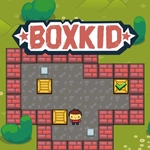
You’re a tiny kid with a big job: shove every crate onto its glowing target before the level locks you in.
💬What is BoxKid?
BoxKid has that deceptively simple look: a small blocky kid, a few crates, glowing targets. Then you shove a crate two tiles too far and realize the whole room is a trap. The core is Sokoban-style pushing—no pulling, no jumping—so every move rotates your options. I kept restarting one mid-level because I'd boxed myself into a corner (literally). That's the hook: mistakes are instant and reversible, but they force you to actually plan.
What surprised me is the control toggle. Bottom-left button swaps between arrow keys and click/tap movement. I played mostly on desktop with keys, but switching to click made those tight corridors feel less twitchy. Some levels have blocks that slide on ice or teleport pads later—don't skip the early ones, they teach you how walls can act as brakes. One level had me using a box as a mobile step to reach a target in an alcove; that moment sold me.
It doesn't overstay its welcome, either. Levels are bite-sized, so a quick break turns into 'just one more' easily. If you enjoy spatial reasoning, BoxKid sits comfortably next to other push-block classics. Give it a shot when you want your brain to do the heavy lifting.
👥How to Play BoxKid
Tap/click bottom left button/icon on gameplay to change game control
✨Game Tips
Hit the bottom-left control button before you start pushing—swapping input styles can get you unstuck fast.
Scan the whole room first; corners are magnets for crate mistakes.
Use restart without shame; the best solutions often come after a stupid mistake.
Think about which crate goes to which target before touching anything—some paths are one-way.
Walls aren't enemies; slide crates along them when you need a stable line of movement.
On touch screens, a light tap works better than a swipe when you need precise single-tile steps.
🔧FAQ
Q: Is BoxKid free to play?
A: Yes, it runs free in any modern browser with no subscription.
Q: Can I play BoxKid on mobile?
A: It supports touch controls, so mobile works fine alongside desktop.
Q: Do I need to download anything for BoxKid?
A: No download needed; just load the page and play instantly.
Q: What are the main controls in BoxKid?
A: Move the kid with arrow keys or swipe; use the bottom-left button to switch control style.
Q: Does BoxKid have many levels?
A: It features a series of increasingly tricky puzzle stages with new mechanics as you go.
Q: Is BoxKid unblocked at school?
A: Since it's an HTML5 browser game, it usually bypasses school filters if your network allows the site.