
Breacker Bricks
Play Count0
Published2022-06-06
Supported DevicesPC + Mobile
CategoryArcade & Classic
Rating★★★★★5.0Rate this game
📝Breacker Bricks Overview
Smash every brick with a paddle you control just by sliding your mouse—miss once and the ball's gone. How long can you keep the rally alive?
💬What is Breacker Bricks?
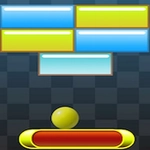
Breacker Bricks nails the old-school paddle-and-ball itch. You get a paddle at the bottom, a field of colored bricks up top, and one tiny sphere that refuses to go where you expect. Control is pure mouse hover—no clicking, no keyboard—which sounds simple until the ball speeds up and you're yanking your cursor across the pad like it owes you money.
The bricks aren't just one-hit wonders. Some shatter after a single tap, others need a couple of smacks, and a few stubborn blocks hang around until you angle a shot into a tight corner. I died twice on one screen because I got greedy chasing a power-up that dropped from a cracked block—turns out a wider paddle doesn't help if you're on the wrong side of the screen. The color palette leans arcade-cabinet bright, and the ball leaves a faint trail when it really starts moving, which is both useful and a little distracting. There's no lives system quite like you remember; you'll get knocked back but the wall layout shifts subtly the deeper you go. I kept coming back to beat my own best rather than the game's levels.
Honestly, the game's name feels like a typo and I love it for that. Breacker Bricks doesn't pretend to be a cinematic reinvention. It's the same loop: serve, nudge, pray, repeat—but the mouse hover control makes it feel strangely intimate. You'll find yourself leaning in, holding your breath when the ball skids along the top wall and shreds an entire row of bricks because you finally found the angle. If you need a five-minute arcade fix that doesn't demand a tutorial, this one's a quiet gem.
👥How to Play Breacker Bricks
mouse hover to control.
✨Game Tips
- Watch the ball's trail when it speeds up; it tells you the angle before the bounce.
- Don't chase every falling power-up until you've cleared a safe pocket near the paddle.
- Aim for the corners—bricks there are easier to smash without sending the ball straight down.
- Use the paddle's edges to redirect diagonally, not just to bounce straight up.
- If a layout looks impossible, clear the top center first to open a path for lucky ricochets.
- Keep your mouse ahead of the ball's shadow, not under it, when things get fast.
🔧FAQ
Q: Is Breacker Bricks free to play?
A: Yes, Breacker Bricks is completely free in your browser with no paywalls.
Q: Do I need to download Breacker Bricks?
A: No download required—it runs right in your browser as an HTML5 game.
Q: Can I play Breacker Bricks on mobile?
A: The game is built for mouse control, so a desktop or laptop is recommended for the best paddle feel.
Q: What are the controls for Breacker Bricks?
A: Just hover your mouse left or right to move the paddle—no clicking needed to keep the ball in play.
Q: Does Breacker Bricks have multiple levels?
A: You'll face a fresh brick layout as you clear each screen, with faster balls and tougher blocks the further you get.
Q: Can I pause or restart Breacker Bricks easily?
A: Yes, during play you can usually press Esc or use on-screen buttons depending on the game window.