
Build An Obby
Play Count0
Published2026-03-05
Supported DevicesPC + Mobile
CategoryAction & Fighting
Rating★★★★★5.0Rate this game
📝Build An Obby Overview
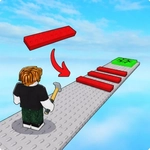
Place blocks mid-air, sprint across your own construction, and pray the next tile doesn't crumble beneath your feet.
💬What is Build An Obby?
Some obbies want you to run someone else's course. Build An Obby flips that by making the level itself part of the challenge. You're not just hopping from platform to platform—you're dropping those platforms into existence while still moving. That split-second juggling act is what separates a clean run from a free fall into the void. Every jump tests your spatial awareness as much as your timing.
I lost count of how many times I placed a block slightly too far ahead, watched my character clip its edge, and plummeted. The physics aren't cruel, but they're honest: if your spacing is off, the game lets you know. After a while, you develop a rhythm—place, jump, rotate camera, place again. On a good run, it feels like speedrunning a level you're building in real time. The best moments come when you recover from a near-miss by slapping down a last-second block under your own feet.
Controls are simple enough on mobile with the joystick and tap-to-interact, but a mouse and keyboard gives you more precision for placing blocks exactly where you want them. There's no hand-holding, which I appreciate. The building mechanic isn't just a gimmick; it forces you to think two moves ahead. You'll hate yourself for a bad placement, then immediately hit retry because it's so quick to get back in. The visual style is clean and readable, so even when chaos erupts, you can still track your character and the next block.
👥How to Play Build An Obby
Just move with WASD or use the joystick on your phone
And use your mouse or tap the button to interact with objects on the map!
✨Game Tips
Place blocks slightly closer than you think you need—overextending is the fastest way to fall.
Rotate the camera often; a fresh angle reveals gaps you'd miss from a fixed view.
On mobile, tap the interactive objects a beat before you reach them to avoid input delay.
Don't be afraid to build temporary bridges across wide gaps, then let them go once you're across.
Practice quick block placement in open areas before tackling the trap-heavy sections.
If you keep dying at a certain point, stop and map out a block route instead of rushing.
🔧FAQ
Q: Is Build An Obby free to play?
A: Yes, it's completely free in your browser. No paywalls or hidden fees.
Q: Can I play Build An Obby on my phone?
A: Yes, the game supports touch controls with a virtual joystick and tap-to-interact.
Q: Do I need to download anything to start playing?
A: No downloads needed. It runs directly in your web browser as an HTML5 game.
Q: What are the controls for Build An Obby?
A: Use WASD on keyboard or the on-screen joystick to move, and your mouse or tap to interact with blocks.
Q: Is Build An Obby multiplayer or single-player?
A: Single-player. You build and run the course yourself, with no online opponents.
Q: Does Build An Obby save my progress?
A: It's a quick session-based game, so progress isn't saved between plays. Each run starts fresh.