
Car Parking Real Simulation
Play Count0
Published2021-03-11
Supported DevicesPC
CategoryArcade & Classic
Rating★★★★★5.0Rate this game
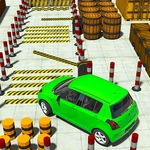
📝Car Parking Real Simulation Overview
Forget racing—this is pure precision. Reverse a sedan into a spot barely wider than the car without clipping a cone, then do it again in a van.
💬What is Car Parking Real Simulation?
I've rage-quit plenty of parking sims, but Car Parking Real Simulation has that one thing most lack: the camera doesn't lie to you. You see exactly what a driver would see, and that's half the battle. The other half is patience, which I ran out of roughly ten attempts into the parallel parking levels.
You get a handful of vehicles, each with different turning radii and acceleration quirks. The sedan is forgiving, but hop in the delivery van and suddenly every pillar becomes a threat. Arrow keys are your only controls—up to go, down to reverse, left and right to steer. No handbrake, no clutch. Just you and the geometry. There's a timer, but it's not frantic; it's just enough pressure to make your palms sweat when you're on the third attempt at a spot against the curb.
The moment I learned to trust the side mirrors was when I stopped overcorrecting. I'd swing wide, straighten out late, and bump the cone behind me. Then I started easing off the gas, letting the car roll backward with tiny taps on the arrow keys. That's the real sim part—no arcade drift, no forgiveness. If you clip a cone, you restart the level. Simple, brutal, and weirdly satisfying when you finally slot into place perfectly.
👥How to Play Car Parking Real Simulation
Use Arrow Keys to control the car
✨Game Tips
Tap the reverse key instead of holding it—rolling back slowly gives you time to correct.
Line up your side mirror with the edge of the parking spot before turning the wheel.
For parallel parking, reverse until your rear wheel is near the curb, then cut the wheel hard.
Start with the sedan; the van and truck punish sloppy steering much faster.
Use the top-down camera view if you're stuck—it reveals the true angle of your car.
🔧FAQ
Q: Is Car Parking Real Simulation free to play?
A: Yes, it's completely free in your browser with no hidden paywalls.
Q: Can I play Car Parking Real Simulation on mobile?
A: Yes, the game supports touch controls on mobile, but arrow keys on desktop give you finer control.
Q: Do I need to download anything to play?
A: No downloads needed. It runs instantly in any modern web browser.
Q: What are the controls for Car Parking Real Simulation?
A: Use arrow keys: up to accelerate, down to reverse, left and right to steer.
Q: Is this game good for learning real parking?
A: It teaches spatial awareness and mirror use, but real cars have a clutch and feedback, so treat it as practice, not a replacement.
Q: Does Car Parking Real Simulation have multiple levels?
A: Yes, there are dozens of parking scenarios, from simple lot spots to tight parallel challenges.