
Cartoon Pigeon Jigsaw
Play Count0
Published2020-01-15
Supported DevicesPC
CategoryArcade & Classic
Rating★★★★★5.0Rate this game
📝Cartoon Pigeon Jigsaw Overview
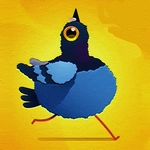
That smug-looking cartoon pigeon isn't going to reassemble itself, so grab a piece and start snapping those feathers into place.
💬What is Cartoon Pigeon Jigsaw?
If you've ever done a jigsaw and thought, "this is missing something," the answer might be a cartoon pigeon. Cartoon Pigeon Jigsaw takes a simple, cheerful illustration of a pigeon—probably looking smug about something—and chops it into pieces. You drag them around with mouse or finger until the picture clicks back together. It's the kind of low-pressure puzzle that's perfect when you need to zone out for a few minutes without committing to a 1000-piece monster.
The gameplay is as straightforward as it sounds. The puzzle offers a few different piece counts, so you can pick a quick 12-piece scatter or a more deliberate 48-piece challenge. The pieces snap nicely when they're close to the right spot, which is a small mercy. I found myself starting with the eye and the beak—somehow the pigeon's expression makes the whole thing funnier once it's complete. The background colors help you sort pieces by sky, feathers, and beak, but there's enough variation that it never feels like busy work. And if you ever lose a piece? It's still on the board, just hiding behind another—no couch cushions involved.
What I like most is that it never overstays its welcome. No timers, no ads blaring at you between moves, just a clean puzzle with a cartoon bird that looks mildly judgmental. It works fine on a trackpad or a touchscreen, so you can play it on a laptop during a break or on a phone while waiting. The sound effects are subtle, just a soft click when a piece settles, which matters more than you'd think. I've played plenty of jigsaw games where the fanfare becomes grating after five minutes. This one keeps it quiet. If you enjoy jigsaws but hate the cleanup, this is a nice little time waster.
👥How to Play Cartoon Pigeon Jigsaw
Mouse or tap to play.
✨Game Tips
Start with the four corners; they give you a frame to build inward from.
Sort pieces by obvious colors first—blue sky, grayish feathers, orange beak.
Use the preview image if you get stuck; the beak placement reveals the whole orientation.
Drag pieces to the edge of the board to keep your workspace clear.
Don't force a piece that looks close but won't snap; it's the wrong one, move on.
🔧FAQ
Q: Is Cartoon Pigeon Jigsaw free?
A: Yes, it's completely free to play in your browser with no hidden payments.
Q: Can I play Cartoon Pigeon Jigsaw on mobile?
A: Absolutely. The touch controls work smoothly on phones and tablets.
Q: Do I need to download anything to play?
A: No download or installation is required. It runs directly in a web browser.
Q: How many puzzle pieces are there?
A: You can usually choose from multiple difficulty levels, from 12 up to 48 pieces.
Q: What if I can't find a piece?
A: Drag pieces aside carefully; sometimes one hides under another pile. They never leave the board.
Q: Is there a time limit?
A: No timer, so you can relax and solve at your own pace.