
Castle Puzzle 3D
Play Count0
Published2020-08-07
Supported DevicesPC
CategoryPuzzle & Thinking
Rating★★★★★5.0Rate this game
📝Castle Puzzle 3D Overview
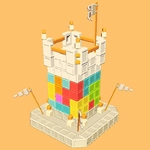
Drag, rotate, and slot chunky stone blocks into a 3D castle skeleton that gets trickier every level.
💬What is Castle Puzzle 3D?
You know those wooden block puzzles where you dump a pile of shapes and try to make them fit a picture? Castle Puzzle 3D cranks that idea into the third dimension, and it's weirdly satisfying. Each level gives you a ghostly wireframe of a medieval castle—towers, walls, gatehouses—and a scattered set of chunky stone blocks. Your job? Drag each block into the frame. Simple, right? Until you realize that the block only fits if it's rotated to the exact angle, and sometimes the piece looks identical to another one except for a tiny notch you didn't spot.
I spent a solid ten minutes on one level where a curved tower piece seemed to go nowhere. I'd drag it in, it would snap back out like a rubber band. Then I spun the camera around—mouse only, you can click-drag on empty space to orbit—and suddenly the slot was glaring at me from the back side. That little "aha" moment is what keeps me clicking next level. The game isn't about speed; it's about patience and spatial reasoning, but there's zero pressure. No timer, no score breathing down your neck. Just you, a castle skeleton, and a pile of blocks that slowly clicks into place.
As you progress, the castles get more elaborate: concentric walls, overhanging battlements, interior courtyards. Some pieces are nearly flat, others are awkward L-shapes that only make sense when combined with two other pieces. The 3D rotation can be a bit fiddly at first—if you're used to flat puzzles, your brain will need a few levels to think in depth. But once it clicks, it's like a fidget toy for your brain. Whether you're killing five minutes or settling in for an hour, it's a solid little puzzle game that respects your time and doesn't insult your intelligence.
👥How to Play Castle Puzzle 3D
Mouse Only
✨Game Tips
Rotate the camera often—some slots only reveal themselves from a top-down or back view.
Before dragging a piece, compare its silhouette to the wireframe; notch and angle mismatches cause the snap-back.
Focus on the largest blocks first; they usually lock in the overall structure and limit where other pieces can go.
If a piece won't fit, try rotating it mid-air by dragging in a small circle while holding the mouse button.
Don't ignore flat pieces—they often fill floor or roof sections that are easy to confuse with walls.
Take a screenshot or mentally note the outline before filling it; once pieces cover the frame, it's harder to see what's left.
🔧FAQ
Q: Is Castle Puzzle 3D free to play?
A: Yes, it's completely free in your browser. No hidden charges or paywalls.
Q: Can I play Castle Puzzle 3D on mobile?
A: Yes, the game works on mobile browsers and desktop. Touch controls are supported for dragging pieces.
Q: Do I need to download anything?
A: No download or install needed. Just open the game page and start playing instantly.
Q: What are the controls?
A: Mouse only. Drag and drop pieces, click-drag empty space to rotate the camera, and use scroll wheel to zoom.
Q: Is Castle Puzzle 3D suitable for kids?
A: Absolutely. It's a non-violent, brain-teasing puzzle that improves spatial skills for all ages.
Q: Are there any time limits or scores?
A: No timers or scores. Take your time and solve each castle at your own pace.