
Chicken Shooting 2D
Play Count0
Published2022-03-07
Supported DevicesPC
CategoryArcade & Classic
Rating★★★★★5.0Rate this game
📝Chicken Shooting 2D Overview
Grab your rifle, steady the crosshair, and blast wave after wave of clucking troublemakers before they overrun your scoreboard.
💬What is Chicken Shooting 2D?
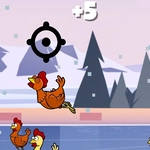
Chicken Shooting 2D is exactly what it sounds like, and that's the beauty of it. You've got a rifle, a crosshair, and a screen full of clucking targets that don't want to die quietly. The controls are dead simple: arrow keys slide your aim around, space fires, R reloads the chamber. There's no cover system, no health bar, no story. Just you, your reflexes, and an endless wave of birds that get faster and more numerous the longer you survive.
I'll admit, I died three times before I figured out the rhythm. The first time I spammed space too hard and ran dry just as a fat chicken waddled into my crosshair. Then I got cocky and tried to track two targets at once, missed both, and got pecked into a restart. What actually worked was slowing down. Take a breath, line up a shot, squeeze off one round, and immediately start reloading if the screen's even half full. The reload time feels punishing on purpose—it forces you to pick your moment. Once I started treating each bullet like a limited resource, my score doubled.
The game has that old-school arcade loop: one more run, one more run, okay one more. It's not flashy, but the hit feedback is satisfying—a little puff of feathers and the score ticks up. The bigger chickens take two hits and waddle slower, but they're worth a heap more points. I usually thin out the small ones first, then pick off the fatties while my magazine refills. If you're after a quick five-minute break or a full hour of grinding for high scores, this scratches that itch. Just don't blame me when you hear clucking in your sleep.
👥How to Play Chicken Shooting 2D
Use Arrow to move the point and space to shoot and r to reload
✨Game Tips
Reload before the screen gets crowded, not after—an empty chamber mid-wave is a death sentence.
Lead your shots slightly when chickens change direction; the bullet has travel time.
Use the edges of the arena to funnel targets into straight lines for easy kills.
Resist spamming space. Each bullet counts when the reload animation drags.
Take out small fast chickens first, then deal with the slower high-value big birds while reloading.
If you miss twice in a row, stop aiming and reposition your crosshair to reset your rhythm.
🔧FAQ
Q: Is Chicken Shooting 2D free to play?
A: Yes, it's completely free with no hidden paywalls or premium upgrades.
Q: Can I play Chicken Shooting 2D on my phone?
A: The game works on mobile browsers, but arrow keys are replaced by touch controls. A keyboard is recommended.
Q: Do I need to download anything to start playing?
A: No downloads or installs. It runs right in your browser as an HTML5 game.
Q: What are the controls for Chicken Shooting 2D?
A: Use arrow keys to move the crosshair, press Space to fire, and press R to reload your rifle.
Q: Why does my gun sometimes not fire?
A: You're out of ammo. Press R to reload—there's no auto-reload, so keep an eye on your magazine.
Q: Is Chicken Shooting 2D unblocked at school?
A: Yes, it's hosted on unblocked game sites and doesn't require any external downloads or plugins.