
Christmas Bricks
Play Count0
Published2021-12-23
Supported DevicesPC + Mobile
CategoryArcade & Classic
Rating★★★★★5.0Rate this game
📝Christmas Bricks Overview
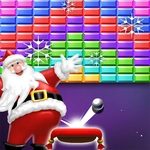
Smash glowing bricks, catch falling candy canes, and keep that shiny ball in play — Christmas Bricks turns the classic paddle-and-ball rush into a holiday reflex test.
💬What is Christmas Bricks?
You've played breakout clones a hundred times, but Christmas Bricks wraps the formula in frosty charm without making you wait through cutscenes. The ball ricochets off bricks arranged in candy-cane stripes and snowflake patterns, and every bounce sounds like a tiny sleigh bell. On desktop, the arrow keys steer your paddle; on mobile, you slide your finger left or right, and the paddle follows with almost no lag. That responsiveness is the game's secret weapon — you'll need it when the ball speeds up after the first two rows fall.
The moment a red brick crumbles and a peppermint power-up drifts toward your paddle, you have to make a split-second call: stay safe for the ball or slide under the candy. Getting greedy feels awesome when it pays off, but I've lost more runs than I'd like by chasing a shiny bonus instead of the ball. The difficulty curve knows exactly when to push: just as you settle into a rhythm, the ball starts caroming off the side walls at sharper angles, and suddenly your calm paddle taps turn into frantic corrections. I kept coming back because the game respects your time — no lives system, no ads between rounds, just the pure loop of smash, catch, repeat.
Visually, it's light enough to run on a school Chromebook without stuttering, but the Christmas touches (falling snow, glowing bricks, occasional jingle flourish) keep it from feeling generic. If you've got five minutes between classes or a lunch break to kill, this is the kind of unblocked game that scratches the reflex itch without demanding a tutorial. Just don't blame me when you look up and realize forty minutes vanished.
👥How to Play Christmas Bricks
Slide Left and right to control the paddle
Use Arrows in Desktop
✨Game Tips
- Keep your eyes on the ball's angle, not just the paddle — bricks near the edges often send it sideways fast.
- Slide early on mobile; the controls are responsive enough to catch drops without overshooting if you start your move before the ball is close.
- Prioritize breaking the top rows first; clearing a vertical column gives the ball a satisfying path and lessens unpredictable ricochets.
- Don't chase every power-up if it means losing the ball — sometimes a safe return is worth more than a fancy bonus.
- On desktop, tap the arrow keys lightly instead of holding them down to fine-tune paddle position at high speeds.
🔧FAQ
Q: Is Christmas Bricks free to play?
A: Yes, it's completely free in your browser with no hidden fees or subscriptions.
Q: Can I play Christmas Bricks on my phone?
A: Absolutely. Slide your finger left or right on the screen to move the paddle.
Q: Do I need to download anything?
A: No download needed. Just open the game page and start smashing bricks.
Q: What are the desktop controls?
A: Use the left and right arrow keys on your keyboard to steer the paddle.
Q: Does Christmas Bricks need an internet connection?
A: Yes, since it runs as an HTML5 game in your browser, you'll need a stable connection.
Q: Is my progress saved automatically?
A: High scores usually reset each session, but the game saves your best run locally if your browser allows it.