
City Bus Parking Challenge Simulator 3D
Play Count0
Published2023-11-17
Supported DevicesPC
CategoryDriving & Racing
Rating★★★★★5.0Rate this game
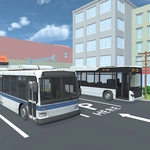
📝City Bus Parking Challenge Simulator 3D Overview
Squeeze a 40-foot bus into a tight city parking spot without scraping a single bumper.
💬What is City Bus Parking Challenge Simulator 3D?
You're behind the wheel of a full-size city bus, and the job is simple: drive through busy streets, line up with the marked parking bay, and ease that long metal beast into place. The 3D view makes the scale feel real — that front overhang swings wider than you expect, and the rear wheels turn on a different radius than the front. I kept clipping the back bumper on my first few tries because I forgot the bus is basically a limousine with a steering wheel.
Controls are straightforward: WASD or arrow keys to move, Space to brake. But don't let that fool you. Braking late will send the bus sliding past the spot, while braking too early means you crawl forward inch by inch, second-guessing every angle. The game rewards patience and a good eye for mirrors. Use the side mirrors to check your rear clearance before committing — there's no quick reset if you crunch a parked car.
What keeps me coming back is that each level changes the parking lot layout, adds tighter corners, or throws in moving traffic. It's the kind of game you can play for five minutes or lose an hour to. No timers, no pressure, just you and a very large vehicle that refuses to fit where you want it to. It's oddly satisfying when you finally nail a reverse park with an inch to spare.
👥How to Play City Bus Parking Challenge Simulator 3D
WASD or arrow keys for directions.
Space for Break.
✨Game Tips
Cut wide on right turns so the back wheels don't jump the curb.
Brake early — buses don't stop like sports cars.
Use the side mirrors to line up the rear bumper before committing.
Tap Space repeatedly for fine adjustments instead of holding it down.
Watch the front overhang when pulling into a spot; it swings wide.
Don't rush — there's no time limit on most levels.
🔧FAQ
Q: Is City Bus Parking Challenge Simulator 3D free?
A: Yes, it's completely free to play in your browser.
Q: Can I play City Bus Parking Challenge Simulator 3D on mobile?
A: Yes, the game works on mobile browsers with touch controls.
Q: Do I need to download anything to play?
A: No downloads needed. It runs instantly as an HTML5 game.
Q: What are the controls for City Bus Parking Challenge Simulator 3D?
A: Use WASD or arrow keys to drive, Space for brake.
Q: Is City Bus Parking Challenge Simulator 3D unblocked at school?
A: Usually yes, since it's hosted on unblocked game sites.
Q: Can I use a gamepad with City Bus Parking Challenge Simulator 3D?
A: Most gamepads work if your browser supports the Gamepad API.