
Clone Jumping
Play Count0
Published2022-05-09
Supported DevicesPC + Mobile
CategoryArcade & Classic
Rating★★★★★5.0Rate this game
📝Clone Jumping Overview
Tap left, tap right, and pray your clone doesn't faceplant into a spike pit—Clone Jumping turns simple controls into a high-score obsession.
💬What is Clone Jumping?
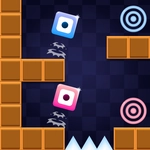
Clone Jumping doesn't pretend to be complicated. You get a little clone, a screen that won't stop scrolling, and two keys: left and right. The jump part? That's handled for you. Your clone bounces on its own, which sounds forgiving until the platforms start moving, vanishing, or sprouting spikes. I died about fifteen times before I stopped overcorrecting.
Here's the thing about the controls: they're simple, but the timing window is tighter than it looks. A tap too late sends your clone through a gap you didn't see because you were already planning the next jump. The floaty physics feel odd at first—like the clone hangs in the air a beat longer than you expect—but after a few runs you start reading the arc of each bounce. What keeps me coming back is the clean risk-reward. Do I inch toward the edge for a better landing spot, or do I stay safe and settle for a lower score? That split-second decision is the whole game.
Visually, it's bright and basic, which suits quick sessions. No menus to fight, no upgrades to grind. Just you, your clone, and the leaderboard. If you've got three minutes or thirty, Clone Jumping slots into that arcade sweet spot where one more run always seems reasonable—especially when your last death was one pixel away from a new best. The collision boxes are a little unforgiving near spikes, so learn the exact corner where your clone can squeeze through.
👥How to Play Clone Jumping
Use your keyboard right and left keyboard buttons
✨Game Tips
Don't hold the left or right key; quick taps give you the fine control you need on narrow platforms.
Watch the shadow under your clone to judge where you'll land before the platform scrolls into view.
Prioritize landing on the next solid platform over grabbing an item; that orb won't save you from falling.
Keep your eyes about one screen ahead—by the time you see a gap, you should already be adjusting.
If you overshoot left, don't slam right; a small counter-tap is often enough to correct without losing momentum.
Practice dying on purpose from the first few spikes to learn the collision boxes; they're wider than the sprite suggests.
🔧FAQ
Q: Is Clone Jumping free to play?
A: Yes, it's completely free in your browser.
Q: Can I play Clone Jumping on mobile?
A: The game works best with a physical keyboard, but many mobile browsers can handle simple left/right taps.
Q: Do I need to download anything to play Clone Jumping?
A: No download or install needed—just open the page and start playing.
Q: What are the controls for Clone Jumping?
A: Only the left and right arrow keys. Your clone jumps automatically; your job is horizontal positioning.
Q: Why does my clone sometimes not jump when I press left or right?
A: It only reads left and right input. If you're near an edge, the auto-jump might trigger at a bad moment—position deliberately.
Q: Can I save my high score in Clone Jumping?
A: Your best score is stored locally in your browser, but clearing cache will reset it.