
Comparing Numbers? – Quick Math Game
Play Count0
Published2026-03-30
Supported DevicesPC + Mobile
CategoryFun & Crazy
Rating★★★★★5.0Rate this game
📝Comparing Numbers? – Quick Math Game Overview
Which symbol makes the statement true? Tap the right one before your brain trips over itself in this rapid-fire math showdown.
💬What is Comparing Numbers? – Quick Math Game?
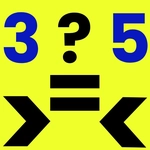
This isn't one of those games that pretends to teach you something while boring you to death. Comparing Numbers? – Quick Math Game strips math down to a single decision: is the first number bigger, smaller, or equal to the second? You get three buttons on screen—>, <, and =—and a pair of values. Click the right one. That's it. The challenge comes from speed, because the rounds don't wait around while you count on your fingers.
I lost more than a few early runs because I'd see something like 58 and 85, my brain would flip the digits, and I'd smash the wrong symbol. The game punishes exactly that kind of careless mistake, but not in a mean way. It just resets your streak or docks a point and throws the next problem at you. You'll settle into a rhythm after a while, almost like a tap-tap-tap reflex test. Kids will find it helpful for memorizing which direction the alligator mouth points; adults will use it to keep their mental arithmetic sharp during a coffee break. There's no story, no unlockables, no complicated menu. Just numbers and symbols.
If you're looking for a game that respects your time and gives your brain a quick workout, this one does the job. It works with a mouse or a touchscreen, so playing on a phone during lunch is actually comfortable. I'd keep the volume low if you're in class, but honestly the sound cues are minimal. One tip from someone who's restarted more times than I'd like: don't overthink. The instant you start second-guessing whether 99 is greater than 100, you've already lost.
👥How to Play Comparing Numbers? – Quick Math Game
Mouse click or tap the correct symbol (> , < , =) to answer.
✨Game Tips
- Treat the symbols as a reflex: left means "bigger," right means "smaller." Don't read them as words.
- Watch out for mirrored digits like 47 and 74—they're designed to trip you up.
- Keep your cursor or thumb hovering in the middle so you can tap any symbol instantly.
- If you miss one, don't look at the score. The next problem is already on screen.
- Practice quick comparisons with two-digit numbers first, then push yourself on three-digit rounds.
🔧FAQ
Q: Is Comparing Numbers? – Quick Math Game free?
A: Yes, it's completely free to play in your browser with no hidden charges.
Q: Do I need to download anything to play?
A: No download or installation is required. Just open the page and start clicking.
Q: Can I play Comparing Numbers? – Quick Math Game on mobile?
A: Absolutely. The touch controls work smoothly on phones and tablets.
Q: What age is this game suitable for?
A: It's designed for all ages, especially young students learning to compare numbers and adults wanting a quick brain boost.
Q: What do I do if the game doesn't load?
A: Refresh the page and make sure your browser is updated. Since it's HTML5, no plugins are needed.
Q: Does the game save my high score?
A: High scores may be saved locally in your browser. Clearing browser data can reset progress.