
Crazy 3D Pixel Shooting
Play Count0
Published2021-04-02
Supported DevicesPC
CategoryAction & Fighting
Rating★★★★★5.0Rate this game
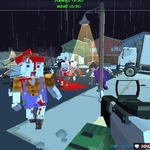
📝Crazy 3D Pixel Shooting Overview
Grab a pixelated rifle, pick your best skin, and drop into a blocky arena where every corner hides another trigger-happy player.
💬What is Crazy 3D Pixel Shooting?
The first thing you notice in Crazy 3D Pixel Shooting is how the blocky, retro look makes everyone easy to spot against the bright arenas. That's good, because you'll die a lot. I spent my first few rounds sprinting into open spaces and getting shredded. Then I learned to hug walls, peek corners, and listen for gunfire echoing off voxel walls. It's simple: move with WASD, point with the mouse, click to shoot. But the real depth comes from the gun system. Press TAB and a menu pops up to swap weapons. Hit E to tweak attachments like scopes or grips. Q cycles through skins, which sounds cosmetic but sometimes the camo actually blends in with certain maps. Sneaky.
One match I grabbed an SMG with a red dot sight and went full panic mode in a tight corridor. I emptied a mag, missed most shots, then switched to a shotgun and camped a doorway. Two enemies rushed in back-to-back — boom, boom, double kill. That's the kind of dumb fun this game delivers. It's not about realism; it's about fast respawns, chaotic firefights, and occasionally pulling off a play that makes you feel like a pixelated action hero. The pixel art style keeps performance smooth even on older laptops, and the hitboxes feel fair —ish. You can blame your aim, but the bullets go where the crosshair points.
Since it's browser-based multiplayer, you're always dropping into servers with strangers. No friend list needed, though you can play solo if you prefer bots. The only downside: sometimes the lobbies are empty depending on time of day. But when they're full, it's a great time killer for 10 minutes between classes. I'd recommend turning your mouse sensitivity down a bit — the default feels twitchy. Overall, Crazy 3D Pixel Shooting is the kind of game you open, die five times, rage-quit, then reopen an hour later.
👥How to Play Crazy 3D Pixel Shooting
Move "WASD"
Use mouse to shoot, aim and change gun
menu "TAB"
Change attachaments "E"
Change skin gun "Q"
✨Game Tips
Lower your mouse sensitivity in settings before your first match — default is twitchy.
Press TAB to check weapon menu; you can switch guns mid-fight if you're fast.
Use Q to cycle skins, but pick a dark pattern for indoor maps.
Attachments matter: a red dot sight helps on SMGs, while a scope works better on rifles.
Don't sprint around corners; walk and pre-aim at head height.
If the lobby is empty, try a different time or refresh — servers fill up randomly.
🔧FAQ
Q: Is Crazy 3D Pixel Shooting free to play?
A: Yes, it's completely free in your browser. No payment or account needed.
Q: Can I play Crazy 3D Pixel Shooting on mobile?
A: It's designed for keyboard and mouse. Mobile touch controls may work but aren't ideal.
Q: Do I need to download anything to play?
A: No download required. Just open the game page in a modern browser like Chrome or Firefox.
Q: How do I change weapons in Crazy 3D Pixel Shooting?
A: Press TAB to open the menu, then select a weapon. Use E for attachments and Q for skins.
Q: Is this game multiplayer only?
A: It focuses on multiplayer, but you can often play solo against bots if no players are online.
Q: Why is my game lagging?
A: Close other tabs and lower graphics settings if available. The pixel style is lightweight but your internet matters.