
Creepy Zombie Jigsaw
Play Count0
Published2020-09-30
Supported DevicesPC
CategoryPuzzle & Thinking
Rating★★★★★5.0Rate this game
📝Creepy Zombie Jigsaw Overview
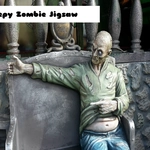
A rotting hand reaches out from the scattered pieces — can you piece together the undead before the timer drains?
💬What is Creepy Zombie Jigsaw?
You know that little jolt when a puzzle piece finally clicks and the full picture snaps into focus? In Creepy Zombie Jigsaw, that moment comes with a side of unease. The board throws you a pile of jagged shards, each hiding part of a decaying zombie face, a torn bloody shirt, or the glint of a milky eye. You drag and drop with your mouse, hunting for edges and color matches while a timer quietly ticks down. It's not a horror game — it's a jigsaw with a horror skin, and that's exactly why it works.
I found myself falling into that familiar puzzle trance, except every completed section revealed something more grotesque than the last. One minute I'm lining up a pale green forehead, the next I'm staring at exposed teeth and wondering why I'm smiling. The creep factor adds a strange thrill that plain landscape puzzles never give you. The pieces themselves are classic HTML5 jigsaw mechanics: click, drag, drop, rotate if the version allows it. Some images hide tricky spots — shadows blur into shadows, and you'll second-guess whether that black chunk belongs to a background or a zombie's rotting jaw.
My advice? Don't try to be a hero. Start with corners, build the frame, then fill in the eyes or mouth region first. Those high-contrast features are easier to spot than the murky background texture. And if a piece doesn't fit after a couple of tries, leave it alone — there's always another one that will. The timer isn't punishing, but it keeps you from zoning out completely. Perfect for a break between classes or a spooky late-night session when you want your puzzles with a little bite.
👥How to Play Creepy Zombie Jigsaw
Mouse Drag and Drop
✨Game Tips
Start with corner and edge pieces to build a solid frame before tackling the middle.\\nFocus on high-contrast features like eyes, teeth, or torn clothing to make matching easier.\\nDon't force a piece that almost fits — set it aside and come back later when you see its neighbor.\\nUse the reference image if there's a peek button, it saves minutes on dark areas.\\nWork in small sections; complete one zombie feature before moving to the next.\\nIf the timer stresses you out, ignore it and just enjoy the slow reveal of the creepy art.
🔧FAQ
Q: Is Creepy Zombie Jigsaw free?\nA: Yes, it's completely free to play in your browser with no hidden costs.\n\nQ: Do I need to download anything to play?\nA: No downloads needed. It runs in HTML5 so just open the page and start dragging pieces.\n\nQ: Can I play Creepy Zombie Jigsaw on mobile?\nA: Yes, the drag and drop works on touchscreens too, though bigger screens are easier.\n\nQ: What if I can't find a piece?\nA: Check under other pieces or use the shuffle button to reorganize the tray.\n\nQ: Is this game okay for kids?\nA: It has zombie and horror images, so it's better for teens and up who enjoy spooky themes.\n\nQ: Are there different difficulty levels?\nA: Some versions let you choose piece counts, but the core puzzle stays the same.