
Cube Shift - 3D
Play Count0
Published2022-08-03
Supported DevicesPC
CategoryAction & Fighting
Rating★★★★★5.0Rate this game
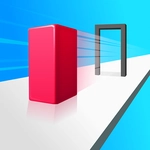
📝Cube Shift - 3D Overview
Dodge, jump, and shift the cube through fast 3D tunnels before the walls close in.
💬What is Cube Shift - 3D?
I died twice in the first ten seconds, and that's exactly what kept me playing. Cube Shift - 3D throws you into a corridor where the floor rushes forward on its own, and your only job is to keep a stubborn little cube from becoming wall paint. The perspective is third-person but tight, so judging depth is half the battle — you'll swear the gap is wide enough, then clip an edge and explode into a shower of pixel shards. There's a section where two walls close in from both sides and the only way through is a narrow slot high above; you have to commit to a jump before you can actually see the opening. It's pure trial and error, and it never feels unfair, just brutally honest.
The controls are simple — arrow keys or WASD to shift left, right, and jump — but the game squeezes every drop of nuance out of them. Tapping too hard sends the cube sliding into the next obstacle, while a half-second hesitation means the timing window slams shut. I found myself leaning in my chair during the later sections, like physically moving would help. The difficulty curve is steep but not sadistic: each new pattern introduces a twist, then repeats it enough that you can practice the rhythm. You'll blame the controls, then realize it was you all along. That's when the real addiction starts.
Because it runs in any browser and loads instantly, it's perfect for a five-minute break that turns into fifty. There's no story, no upgrades, no meta progression — just you, the cube, and the endless wall of obstacles. Some players might call that repetitive, but for me it's the purest kind of arcade reflex test. If you have a keyboard and a stubborn streak, you'll find a lot to love here.
👥How to Play Cube Shift - 3D
KeyBoard Controls
✨Game Tips
Use the arrow keys for gentle nudges, not full presses — overcorrecting kills more runs than missing the gap.
Watch the shadow patterns on the floor to judge where the next opening will appear; the lighting is your early warning system.
Memorize the obstacle sequences after a few attempts — they repeat in cycles, so pattern recognition beats raw reflexes.
Don't stare at your own cube; fix your eyes on the incoming wall shapes and let your peripheral vision handle the rest.
If you're stuck on a double-wall jump, tap the jump key a hair earlier than you think — the cube's collision box is slightly larger than it looks.
Take a breath after a frustrating death. The game rewards a clear head more than white-knuckle mashing.
🔧FAQ
Q: Is Cube Shift - 3D free to play?
A: Yes, it's completely free to play right in your browser.
Q: Do I need to download Cube Shift - 3D?
A: No download needed. It runs on HTML5, so just open the page and start playing.
Q: Can I play Cube Shift - 3D on mobile?
A: The game is designed for keyboard controls, so mobile play isn't officially supported.
Q: What are the controls for Cube Shift - 3D?
A: Use arrow keys or WASD to shift left, right, and jump over obstacles.
Q: Why does Cube Shift - 3D lag on my school computer?
A: It's lightweight but close other browser tabs or lower graphics settings if your device is older.
Q: Can I play Cube Shift - 3D offline?
A: No, you need an internet connection because the game loads from a web server.