
Cube Speed Dash
Play Count0
Published2025-05-22
Supported DevicesPC + Mobile
CategoryAction & Fighting
Rating★★★★★5.0Rate this game
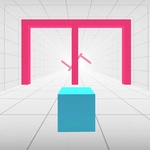
📝Cube Speed Dash Overview
Slam Space, dodge spikes, and hold your breath as the platforms blur past—Cube Speed Dash turns every run into a twitchy race against your own nerves.
💬What is Cube Speed Dash?
I died maybe fourteen times before I realized the game isn't asking you to be fast—it's asking you to be smooth. That's the trap in Cube Speed Dash. The cube moves on its own, accelerating until the world becomes a smear of neon blocks and deadly gaps. Your whole job? Two keys and a spacebar. A to slide left. D to slide right. Space to hop over whatever's trying to end you. Sounds trivial. It's absolutely not.
The first stretch lulls you with wide platforms and generous jump arcs. Then the spike clusters start appearing mid-gap, so you have to thread diagonals while already committed to a leap. There's a moment around the third speed tier where the floor drops away right as a low ceiling spawns—I hit that ceiling more times than I care to admit. What kept me coming back wasn't the score, exactly. It's the rhythm. Once you stop staring at hazards and start trusting your peripheral vision, the inputs become almost musical. Tap, tap, hold, flick left, land, breathe. Then a new pattern shows up and you're dead again.
The restart is instant. That matters more than it sounds. No menus, no countdown, just back to the starting line while the music's still ringing in your ears. If you're the type who likes shaving milliseconds or just want something brutally honest between classes, this one's a gem.
👥How to Play Cube Speed Dash
A: Move Left
D: Move Right
Space: Jump
✨Game Tips
Don't watch the cube—watch the space ahead of it. Your eyes should already be on the next gap by the time you jump.
Tap Space for short hops, hold it for longer airtime. Holding too long will float you into a ceiling or overshoot a landing.
A and D are faster than arrow keys for lane changes; keep your hand anchored so you don't lose the rhythm.
Memorize the first three obstacle patterns. They repeat with minor variations, and knowing them buys you reaction time later.
If you're about to clip a spike, don't panic-jump. Let yourself fall into the gap and restart—a clean run beats a desperate one.
🔧FAQ
Q: Is Cube Speed Dash free to play?
A: Yes, it's completely free in your browser with no paywalls or extra downloads.
Q: Can I play Cube Speed Dash on mobile?
A: The game uses keyboard controls, so a computer or laptop gives the best experience. Touch controls aren't supported.
Q: Do I need to install anything to start playing?
A: No installation or plugin required. Just open the page and the HTML5 game loads instantly.
Q: What are the controls for Cube Speed Dash?
A: Use A to move left, D to move right, and Space to jump. That's all you need.
Q: Is Cube Speed Dash unblocked at school?
A: Many school networks allow this game because it's browser-based. If your school blocks game sites, try a different network or ask your admin.
Q: Does Cube Speed Dash need a fast internet connection?
A: A stable connection is enough. The game loads once and runs locally, so lag won't affect your jumps.