
Doll Dreamhouse Adventure
Play Count0
Published2023-09-05
Supported DevicesPC
CategoryGirls & Lifestyle
Rating★★★★★5.0Rate this game
📝Doll Dreamhouse Adventure Overview
Unlock every room in the dreamhouse and let your inner decorator run wild with dolls, furniture, and tiny surprises.
💬What is Doll Dreamhouse Adventure?
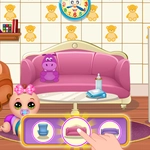
You get a dollhouse shell with empty rooms and a pile of furniture waiting in the corner. Click a couch, drag it into the living room, then swap the wallpaper because that yellow is way too loud. My first playthrough I spent way too long lining up a tiny kitchen sink, only to realize I'd blocked the doorway with a potted plant. The decorating loop is oddly satisfying—every tap adds a little color, a little clutter, and a little more personality.
The adventure part sneaks in through the dolls themselves. You can dress them up in different outfits, pose them around the house, and tap objects to trigger little reactions. Some walls hide sparkly spots that unlock new furniture packs, so I kept poking every corner just to see what would pop out. The doll animations are cute but not overdone, and the sound effects are soft enough that you won't mute the tab within a minute.
It's one of those games you open for five minutes and suddenly realize an hour vanished while you were rearranging a bedroom for the third time. Not hard, not stressful, just cozy. If you like dollhouses, dress-up, or low-pressure decorating, this will scratch that itch without demanding anything from you.
👥How to Play Doll Dreamhouse Adventure
Mouse click or tap to play
✨Game Tips
Start with the largest furniture piece in each room so you don't run out of floor space before adding the fun details.
🔧FAQ
Q: Is Doll Dreamhouse Adventure free?
A: Yes, it's completely free to play in your browser.
Q: Can I play Doll Dreamhouse Adventure on mobile?
A: Yes, it works with touch controls on most phones and tablets.
Q: Do I need to download anything?
A: No download needed—just open the page and start tapping.
Q: How do I control the game?
A: Use your mouse to click and drag, or tap directly on the screen.
Q: Can I play this at school?
A: Yes, it's unblocked and runs in a standard browser window.
Q: Does it save my progress automatically?
A: Your current room layout stays until you refresh or close the tab.