
Draw Climber 2
Play Count0
Published2022-02-28
Supported DevicesPC + Mobile
CategoryAction & Fighting
Rating★★★★★5.0Rate this game
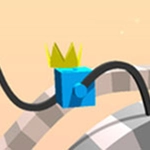
📝Draw Climber 2 Overview
Sketch a wobbly pair of legs, send your blocky buddy rolling, and see if those scribbles can outrun spikes, gaps, and spinning saws.
💬What is Draw Climber 2?
Draw Climber 2 throws you into a simple but brutally picky task: draw legs for a cube and see if it can survive the level. Each stroke you make becomes a physical limb, so a wobbly line turns into a wobbly walker. That's the whole charm. I spent my first five minutes just drawing ridiculous spaghetti legs and laughing as my cube flopped around.
The real hook hits when you hit a wall—literally. You redraw the legs, tweak the angle, and suddenly your cube is striding over gaps that seemed impossible. There's a level with a giant spinning gear right after a steep ramp; I must have redrawn those legs twenty times. When it finally clicked, the little cube's floppy sprint felt earned.
It's not a long game, but the loop is dangerously moreish. One more try turns into ten. The drawing mechanic feels responsive even with a mouse, and the physics are comically exaggerated in all the right ways. If you want a quick brain break that still makes you feel clever, this one's worth a few minutes.
👥How to Play Draw Climber 2
Tap or click.
✨Game Tips
Short, thick legs usually survive better than long spindly ones — torque is your enemy.
Draw slightly forward-leaning legs to give your cube a natural walking rhythm.
Don't overdraw; two simple lines often beat an elaborate scribble.
If the cube faceplants on a jump, try extending the back leg a touch longer.
Pause and redraw mid-level if you see an obstacle coming that your legs can't handle.
🔧FAQ
Q: Is Draw Climber 2 free?
A: Yes, it's completely free to play right in your browser.
Q: Can I play Draw Climber 2 on mobile?
A: It works on phones and tablets, but drawing with a mouse or finger is easiest on a larger screen.
Q: Do I need to download anything?
A: No download needed. Just open the game and start drawing.
Q: How do I control Draw Climber 2?
A: Tap or click and drag to draw the legs. The cube then moves automatically.
Q: Does Draw Climber 2 work on a school Chromebook?
A: Yes, it runs in any modern browser, including Chromebooks.
Q: What's the goal in Draw Climber 2?
A: Get your cube from the start to the finish line by drawing better legs each attempt.