
Easter Card Memory
Play Count0
Published2020-04-03
Supported DevicesPC + Mobile
CategoryFun & Crazy
Rating★★★★★5.0Rate this game
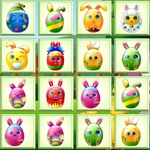
📝Easter Card Memory Overview
Spring has sprung and so have the hidden pairs in this egg-cellent memory challenge — can you match every card before the board slides out of control?
💬What is Easter Card Memory?
Easter Card Memory isn't your typical flip-and-match game, and that's exactly why it hooked me. Instead of just tapping cards where they sit, you're sliding entire rows and columns of face-down Easter cards around the board. You'll see a bunny here, a painted egg there, maybe a chick hiding in the corner — but once you slide that row, everything shifts, and you'd better remember where that bunny went. It's memory with a spatial twist: you're not just recalling which card is which, you're tracking moving targets in your head.
The controls are simple: mouse or fingertip to drag a row left or right, or a column up and down. The trick is that sliding reveals new cards on the opposite edge, so you can cycle through the deck by pushing cards off one side and pulling fresh ones in from the other. I found myself treating it like a conveyor belt of Easter surprises — peek at two cards, then slide the row to line them up for a match. The board starts small and manageable, but as more pairs appear, the sliding becomes a double-edged sword: it helps you bring matches together, but it also wrecks your mental map if you slide blindly.
The Easter theme is light and cheerful without being too kiddie — pastel colors, clean card designs, and a satisfying little chime when you get a pair. I kept coming back because the sliding mechanic made even a simple memory game feel fresh and a little mischievous. If you're tired of static memory games, this one will mess with your head in the best way.
👥How to Play Easter Card Memory
Use mouse or finger tip to slide the block rows and columns.
✨Game Tips
Slide a row only when you're sure you've spotted a pair — random sliding will scramble your mental map.
Peek at two cards quickly then slide the row to bring them adjacent for a match.
Start with the outer columns first since they only have one neighboring row to mix up.
Corner cards stay anchored relative to two edges, so they're easier to track after slides.
If you lose a card, slide the opposite row to see what appears on the other side.
Don't rush the slide — a slow drag gives your brain time to remember positions.
🔧FAQ
Q: Is Easter Card Memory free to play?
A: Yes, it's completely free online. No hidden fees or premium unlocks.
Q: Can I play Easter Card Memory on my phone?
A: Absolutely. It works on mobile browsers with touch controls for sliding rows and columns.
Q: Do I need to download anything to play?
A: No downloads needed. Just open it in your browser and start playing instantly.
Q: How do I slide rows and columns?
A: Use your mouse or finger to drag a row left/right or a column up/down until the desired cards line up.
Q: What's the goal of Easter Card Memory?
A: Match all the Easter-themed cards in pairs by sliding rows and columns to bring matching cards together and flipping them.
Q: Is Easter Card Memory suitable for young kids?
A: Yes, it's family-friendly with cute Easter images and no violence or scary content.