
Fast And Crazy Traffic Driving
Play Count0
Published2021-05-18
Supported DevicesPC
CategoryDriving & Racing
Rating★★★★★5.0Rate this game
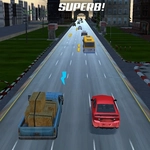
📝Fast And Crazy Traffic Driving Overview
Slam the gas, dodge every car in your path, and time the NOS bursts to thread through gaps that vanish in half a second.
💬What is Fast And Crazy Traffic Driving?
The first thing that surprised me was how quickly a clean highway turns into a metal maze. One second you're cruising at 90, the next you're threading between two trucks with your mirrors practically kissing paint. Fast And Crazy Traffic Driving doesn't care about realism—it cares about that moment when you slam W, grab a speed pickup from the center line, and feel the screen blur.
Here's the loop: hold W to floor it, steer with the mouse or arrow keys (I switched to mouse after the first wipeout), and keep an eye out for glowing speed icons on the road. Those refill your NOS meter. Then, when traffic bunches up, you hit the nitro button and everything gets stupid fast. It's not just a speed boost—it's a risk. Pop it too early and you'll plow into a bus before you can blink. Pop it late and you're already through the gap. I died three times in a row the first minute because I treated it like a regular driving game. Don't.
What kept me coming back wasn't the lighting or the car models (they're serviceable, nothing fancy). It's that the game punishes hesitation but rewards deliberate chaos. You learn to read traffic three cars ahead, to know when a pick-up truck will drift left, to save the NOS for a straight stretch where a lane change is suicide. The frame rate stays smooth even when five cars pile up behind you, which is a small mercy. If you want a racing game with zero tutorials and maximum 'oh crap' moments, this is it.
👥How to Play Fast And Crazy Traffic Driving
w - speed
collect speed from road and push button nos
✨Game Tips
- Save NOS for long straight sections where you have a clear view of the traffic pattern.
- Grab speed pickups even if it means drifting slightly into the shoulder—they refill your nitro.
- Don't hold W constantly; lift off to scrub speed before tight gaps.
- Use short taps on the steering instead of holding the turn, oversteer will kill you.
- Watch the far lane early; traffic tends to clump around slower vehicles.
- When you hear the nitro ready sound, scan ahead for a gap before pressing it.
🔧FAQ
Q: Is Fast And Crazy Traffic Driving really free to play?
A: Yes, it runs directly in your browser with no paywalls or hidden fees.
Q: Do I need to download or install anything?
A: No downloads. It's an HTML5 game that loads instantly on the site.
Q: Can I play Fast And Crazy Traffic Driving on my phone?
A: It works on mobile browsers, but keyboard controls make it best on desktop.
Q: What's the NOS button for?
A: NOS gives you a massive speed burst. Collect speed pickups first to fill the meter.
Q: How do I steer the car?
A: Use arrow keys or move the mouse. The W key accelerates, and you can lift off to brake.
Q: Why does my car crash so often at high speed?
A: Traffic patterns are tight. Save nitro for straight sections and tap steer lightly.