
Fishing Blocks
Play Count0
Published2023-05-31
Supported DevicesPC + Mobile
CategoryArcade & Classic
Rating★★★★★5.0Rate this game
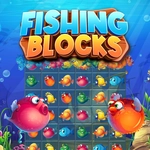
📝Fishing Blocks Overview
Slide the remover block into matching fish schools and watch whole rows vanish before the board floods with slippery tiles.
💬What is Fishing Blocks?
You get a board full of fish tiles, all swimming in neat little grids. Your job is to slide a remover block around using the mouse or touchpad and park it on the same fish as the one you're holding. When the two match, the entire row pops — not just the tile you clicked, the whole horizontal line. It feels simple at first, but the board keeps refilling, and you'll start second-guessing which match will open up the most space.
I kept coming back because the pressure ramps up quietly. One moment you're clearing a row of orange clownfish with zero stress, the next there's a stack of identical blue tangs on the left and your remover block is stuck behind a mismatched pair. That little mental gear-shift — deciding whether to clear the obvious row now or slide toward a bigger combo — is where the game lives. There's no timer on the first few boards, but later the refill speed feels personal, like the game knows you hesitated.
Fishing Blocks sits in that nice arcade-puzzle space where you can play one quick round between classes or accidentally lose twenty minutes. The fish icons are bright enough to read at a glance, which matters when rows are about to lock up. Move deliberately; the mouse controls don't need speed as much as precision. If you're on a laptop touchpad, shorten your swipes a little — the remover block can overshoot when you're frantic.
👥How to Play Fishing Blocks
Use a mouse or touchpad to move the remover block and match it with the identical fish. This will remove the whole row.
✨Game Tips
Line up the remover block with the center of the row you want to clear — edge matches sometimes register late.
If two rows have the same fish, clear the one closest to filling up first.
Don't chase the exact fish icon; any identical match works, so keep an eye on the whole board.
Use short mouse nudges instead of sweeping moves to avoid overshooting on a full grid.
When the refill starts accelerating, prioritize clearing rows that block your remover block's path.
On touchpad, reduce sensitivity slightly if you keep sliding past your target.
🔧FAQ
Q: Is Fishing Blocks free?
A: Yes, you can play it free in your browser.
Q: Can I play Fishing Blocks on mobile?
A: The game supports touch, so it works on most phones and tablets.
Q: Do I need to download anything to play Fishing Blocks?
A: No download needed — it runs directly in your web browser.
Q: What are the controls for Fishing Blocks?
A: Move the remover block with your mouse or touchpad and click to match.
Q: Does Fishing Blocks need fast reflexes?
A: It starts relaxed, but rows refill faster later, so stay calm and plan ahead.
Q: Can I play Fishing Blocks with a keyboard?
A: The primary controls are mouse or touch; keyboard isn't required.