
FPS Simulator
Play Count0
Published2019-11-11
Supported DevicesPC
CategoryAction & Fighting
Rating★★★★★5.0Rate this game
📝FPS Simulator Overview
Strap in, hit WASD, and see how long you can survive waves of enemies in a bare-bones browser shooter that actually feels surprisingly tight.
💬What is FPS Simulator?
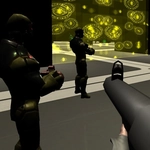
You spawn in a small gray arena with a pistol and a vague sense of dread. Enemies come at you in waves—some melee, some shooting back. The controls are barebones: WASD to move, Shift to sprint, U to pick up weapons, Tab to pause. That's it. No story, no skill tree, no loot boxes. It's refreshing, honestly. The moment you grab a rifle from a crate and start mowing down the first wave, something clicks.
The enemy AI isn't brilliant, but it doesn't need to be. They'll rush you in groups, and if you're not sprinting between cover points, you'll get cornered fast. I kept dying at wave 5 until I learned to circle strafe around the arena's central pillar. Picking up a better weapon with U is a bit clunky mid-fight, but that clunkiness adds tension—do you risk grabbing that shotgun while three guys are closing in? There's no auto-save, so each run is a fresh attempt. The sprint meter isn't infinite, so you can't just run laps forever. That forces you to commit to fights.
For a browser game, the mouse look feels surprisingly responsive, even if the graphics look like something from a PS2 tech demo. The sound design is minimal but effective—each shot echoes in the empty arena. It's not going to replace your favorite AAA shooter, but as a quick lunch-break adrenaline hit, FPS Simulator does the job. If you're after a stripped-down wave survival test that doesn't hold your hand, give it a shot. Just don't expect a tutorial beyond the key prompts on screen.
👥How to Play FPS Simulator
WASD to move
Left Shift to sprint
U to pick weapon
Tab to toggle pause
✨Game Tips
Sprint constantly between cover points; standing still gets you surrounded fast.
Prioritize picking up an SMG or rifle early with U—the pistol falls off hard after wave 3.
Use the central pillar for circle strafing; the enemy AI struggles to track you around corners.
Don't bother pausing with Tab mid-fight unless you need a breather, but it can reset your sprint timing.
Watch your sprint meter—if it runs out while you're flanking, you're an easy target.
Save your ammo for shooters, not melee rushers; a single headshot can drop them before they reach you.
🔧FAQ
Q: Is FPS Simulator free to play?
A: Yes, it's completely free in your browser—no download needed.
Q: Can I play FPS Simulator on mobile?
A: The game is designed for keyboard and mouse, so mobile play isn't supported well.
Q: Do I need to create an account?
A: No account required. Just open the game and start shooting.
Q: Which weapons can I pick up?
A: Pistol, SMG, rifle, and shotgun. Use U near a weapon crate to swap.
Q: How do I pause the game?
A: Press Tab to toggle pause at any time during a wave.
Q: Does FPS Simulator save my progress?
A: No, it's a wave-based score attack. Each run starts fresh.