
Fruits Mahjong
Play Count0
Published2022-01-25
Supported DevicesPC + Mobile
CategoryArcade & Classic
Rating★★★★★5.0Rate this game
📝Fruits Mahjong Overview
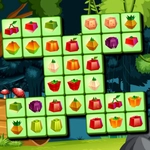
Peaches, melons, and apples sit stacked in layered cubes — find identical fruit tiles and clear the board before your eyes go cross.
💬What is Fruits Mahjong?
Mahjong gets a sugar rush in Fruits Mahjong. Instead of the usual carved ivory dragons and bamboo sticks, every tile shows a bright little fruit icon — watermelon, grape, orange, strawberry. The rules stay classic: you can only remove a tile if it's open (no tile on top of it, and at least one side free). Matching two identical fruit tiles clears them from the board. Simple, until the pile is eight layers deep and you're staring at three identical cherries, two of which are buried under kiwis.
What kept me tapping was the visual clarity. Many fruit mahjong games use tiny icons that blur together, but these tiles are chunky enough to read at a glance. The board layouts rotate through familiar patterns — turtle, pyramid, arrow — and the fruit motifs make it weirdly satisfying to clear a whole stack of bananas in one go. The timer runs in some levels, but there's no pressure if you just want to chill; undo is usually available for those "why did I click that one?" moments.
One thing to watch: just because two matching fruits are visible doesn't mean both can move. You need a free left or right edge. I found myself spotting a pair of plums on opposite sides of a giant stack and losing three moves trying to free one. That's the quiet puzzle of mahjong — every click should create at least one new open tile, or you'll corner yourself. Hint button helps when you're stuck, but I'd save it for the endgame when only a few buried pairs are left. It's a solid coffee-break game; no download, no account, just fruit-tile zen.
👥How to Play Fruits Mahjong
Use mouse or touch pad to play this game.
✨Game Tips
Only tap tiles with at least one free side — otherwise the click won't register.
Clear the tallest layers first, since top tiles often block everything below.
Use undo right away after a bad match; closing a pair can sometimes reveal no new moves.
Save the hint button for the final screen when you're down to 4-6 tiles.
Watch for visually similar fruit like grape vs blueberry; zoom in if your icons feel small.
If a layout gets too messy, restart the level — layouts are randomized, so a fresh board can be kinder.
🔧FAQ
Q: Is Fruits Mahjong free to play?
A: Yes, it's completely free on this page. No purchase or subscription is required.
Q: Can I play Fruits Mahjong on my phone?
A: Absolutely. It works in mobile browsers with touch controls — just tap the fruit tiles.
Q: Do I need to download or install anything?
A: No download needed. The game runs directly in your browser as HTML5.
Q: What are the controls for Fruits Mahjong?
A: Use your mouse or touchscreen to tap an open fruit tile, then tap its matching pair to clear both.
Q: Can I undo a move in Fruits Mahjong?
A: Most versions include an undo button. Use it immediately after a bad match to recover lost pairs.
Q: Is there a timer in Fruits Mahjong?
A: Some layouts have a timer, but many are untimed. Check the top of the screen when a level starts.