
GBox Doubling
Play Count0
Published2023-09-18
Supported DevicesPC + Mobile
CategoryPuzzle & Thinking
Rating★★★★★5.0Rate this game
📝GBox Doubling Overview
Hold and swipe to shift every tile at once—equal numbers fuse into bigger ones, but one bad move can clog the whole board.
💬What is GBox Doubling?
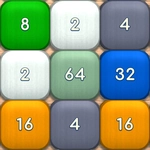
GBox Doubling gives you a grid of numbered tiles and one simple instruction: make them touch. You drag the mouse across the field (or tap arrow keys) and every tile slides that way until it hits a wall or another tile. When two tiles with the same number collide, they merge into a single tile worth their sum—so a 2 and a 2 become a 4, then 8, 16, and so on. The catch is that every move shifts the entire board, so you're not just pairing one tile; you're shifting a whole ecosystem of numbers at once. A tile you wanted to save might get shoved into a corner, and suddenly a promising row turns into a traffic jam.
What hooked me is how quickly the board goes from calm to chaotic. One moment I'm lining up three 32s for a beautiful cascade, and the next I've accidentally merged two 2s that sealed off my biggest number. That's the real puzzle—not just spotting matches, but predicting where every tile will land after a drag. Because all tiles move together, you have to think two or three steps ahead, like playing a tiny game of billiards with numbers. I kept coming back after each loss because the next board always felt just fixable enough.
Keyboard arrows feel more precise for small adjustments, while mouse swipes are faster once you internalize the grid. There's no timer and no lives, so you can take your time—but that patience gets tested when a single misplaced merge spawns a new tile right where you didn't want it. If you've played other number-sliding games, this one adds a subtle twist: the whole-field movement means every decision echoes across the board, making even a "safe" slide feel like a small gamble.
👥How to Play GBox Doubling
Hold down the left mouse button and move the mouse across the playing field in the direction you want all the tiles to move, or use the arrows on your keyboard. Tiles of the same number that touch each other will merge into a single tile. This tile will d
✨Game Tips
Stick to two adjacent directions (like down and left) early on—it keeps your highest tile anchored in a corner.
Before you drag, scan the row or column perpendicular to your move; that's where new tiles will slam into place.
Avoid merging low numbers needlessly if they're far from your main stack; they'll clog lanes.
Use arrow keys when you need precision, mouse swipes for speed once you know the grid.
When a board feels stuck, deliberately sacrifice a low tile to open a path for your big number.
Keep your largest tile against an edge; dragging parallel to that edge is usually safer.
🔧FAQ
Q: Is GBox Doubling free?
A: Yes, it's completely free to play in your browser with no hidden paywalls or time locks.
Q: Can I play GBox Doubling on mobile?
A: The game supports touch input, so you can swipe on a phone or tablet browser without downloading an app.
Q: Do I need to install anything to play?
A: No installation needed. Just open the game page in any modern web browser and start merging.
Q: What is the goal of GBox Doubling?
A: Merge identical numbered tiles to create bigger numbers and keep the board from filling up completely.
Q: Are there keyboard controls?
A: Yes, you can use the arrow keys to shift all tiles in that direction instead of dragging the mouse.
Q: Does GBox Doubling save my high score?
A: Your best score is usually stored locally in your browser, so it'll be there next time you visit.