
Geometry Square
Play Count0
Published2025-02-06
Supported DevicesPC + Mobile
CategoryArcade & Classic
Rating★★★★★5.0Rate this game
📝Geometry Square Overview
Tap, leap, and dodge your way through razor-sharp geometry in this twitchy one-button arcade challenge.
💬What is Geometry Square?
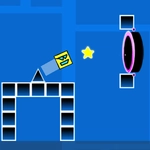
The click-to-jump setup sounds almost too basic, but that's exactly what kept me coming back. Your little square sits on a flat line, and every chunk of the level scrolls toward you with gaps, spikes, and moving walls. One click, one jump. That's it. But the jump arc is tight and floaty at the same time, so you'll die a lot while learning exactly when to tap. I remember a section where three vertical blocks sweep in from the right at different heights—you have to hop the first, wait, then double-hop the pair, all while the background pulses in saturated pinks and blues. It's a game that rewards patience more than fast fingers.
Stars are scattered along the dangerous paths, not off to the side, so grabbing them means taking real risks. You can spend them in the shop on different square skins—some are silly, some look like little robots, and a few are honestly ugly in the best way. The levels get progressively trickier, but they never feel unfair because the hitbox on your square is just forgiving enough. If you're stuck, don't mash; watch the pattern, count the beats, and jump a fraction later than you think. That tiny adjustment got me through five levels in a row. It's a perfect lunch-break game.
👥How to Play Geometry Square
*To play the game and jump, simply click. Click with the mouse or your finger. *Collect stars to buy costumes from the shop. *Reach the portal to pass the levels.
✨Game Tips
Tap later than you think on tight gaps—your square's hitbox is smaller than it looks.
Collect stars only when the route feels safe; you can replay levels to farm them.
Save up for the weirdest costume in the shop; it doesn't help stats but it makes losing funnier.
Watch the moving obstacles for two full cycles before attempting a tricky section.
Don't hold the click; each jump is a fixed arc, so short taps and long taps do the same thing.
Use the portal's glow as a target line—some jumps line up better when you aim for its center.
🔧FAQ
Q: Is Geometry Square free?
A: Yes, it's completely free to play right in your browser.
Q: Can I play Geometry Square on mobile?
A: Absolutely—it works with touch, just tap the screen to jump.
Q: Do I need to download anything to play?
A: No downloads or installs needed, just open the page and start clicking.
Q: How do I change my square's look?
A: Collect stars during levels, then spend them in the shop on new costumes.
Q: What's the goal in each level?
A: Reach the glowing portal at the end of each level without hitting obstacles.
Q: Why do I keep dying at the same spot?
A: Practice the timing; obstacles follow fixed patterns, so wait and jump later than you think.