
Gummy Bears Mover
Play Count0
Published2021-04-22
Supported DevicesPC + Mobile
CategoryGirls & Lifestyle
Rating★★★★★5.0Rate this game
📝Gummy Bears Mover Overview
Squishy, colorful, and weirdly addictive — Gummy Bears Mover dares you to sort a jumbled pile of gummy bears into tidy rows before the board turns into a sticky mess.
💬What is Gummy Bears Mover?
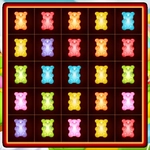
I don't know who decided gummy bears needed to be organized, but they clearly understood something about satisfaction. Gummy Bears Mover drops you onto a board full of squishy, brightly colored bears and asks one simple thing: get them into tidy little rows. What starts as a calm, almost meditative task quickly turns into a game of "wait, where did that orange one go?" The bears wobble when you drag them, the colors blend together if you're not paying attention, and every so often a row locks in with a little squish sound that feels way better than it has any right to.
The controls are as basic as it gets — mouse or touchpad, click and drag. But don't let that fool you. The real challenge is planning. You can't just shove bears around randomly; space fills up, and a misplaced bear can block an entire column. I found myself staring at a cluster of greens for a good ten seconds, mentally mapping out three moves ahead. That moment when you finally clear a stuck row and the whole board shifts? Genuinely rewarding. It's a puzzle game dressed up in candy colors, and it's smarter than it looks.
Honestly, this is one of those games you open for two minutes and then realize twenty minutes have passed. It's perfect for a quick break, easy enough for kids but engaging enough that I kept coming back. The pastel palette and soft animations make it feel cozy, while the occasional tricky level keeps your brain from going on autopilot. If you like sorting games, color-matching, or just gummy bears, you'll feel right at home.
👥How to Play Gummy Bears Mover
Use mouse or touch pad to play this game.
✨Game Tips
• Start with the corners — clearing those first opens up the board.
• Drag slowly; gummy bears wobble and can slip if you jerk the mouse.
• Look for clusters of the same color before making your move.
• If a row locks into place, don't fight it — build around it.
• Take a breath after each level; this gets surprisingly tense.
• Use a mouse instead of a trackpad for finer control.
🔧FAQ
Q: Is Gummy Bears Mover free to play?
A: Yes, it's completely free and runs right in your browser with no hidden costs.
Q: Do I need to download anything?
A: No downloads or installs needed — just open the page and start playing.
Q: Can I play Gummy Bears Mover on my phone?
A: Yes, it works on mobile browsers using touch controls, though a mouse gives you more precision.
Q: What are the controls?
A: Use your mouse or touchpad to click and drag gummy bears around the board.
Q: Is this game suitable for kids?
A: Absolutely. It's non-violent, colorful, and the sorting mechanic is easy for younger players to grasp.
Q: Why won't the gummy bears move the way I want?
A: Make sure your cursor is directly on a bear and drag slowly — fast movements can make them slip back.