
Halloween Link
Play Count0
Published2020-10-27
Supported DevicesPC + Mobile
CategoryPuzzle & Thinking
Rating★★★★★5.0Rate this game
📝Halloween Link Overview
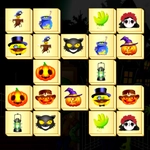
Clear the board of spooky Halloween tiles by linking matching pairs with paths that twist no more than twice.
💬What is Halloween Link?
Halloween Link is the kind of puzzle game that starts off feeling like a casual time-waster and then quietly hijacks your afternoon. You’re staring at a grid packed with pumpkins, bats, candy corn, and little ghost faces, and your job is to clear them all by connecting two identical tiles. The catch? The line between them can only bend twice. That little rule turns every board into a mini logic problem—sometimes the obvious pair is a trap, and the winning path is the one you didn’t see until the timer started ticking.
What I actually like here is the pacing. The game doesn’t bombard you with timers or lives from the jump, but the longer you stare at a board, the more those tiles seem to rearrange themselves in your head. You’ll spot a pair of witch hats on opposite corners and trace an L-shaped path through clutter, only to realize you needed to clear a zombie couple first to open up the straight line. That “aha, now I see it” moment happens a lot. And because it’s Halloween-themed, the art is playful rather than spooky—think cartoon monsters and glowing jack-o’-lanterns, not jump scares. It’s perfect for a quick break between classes, though you might tell yourself “one more board” and look up twenty minutes later.
If you’re the type who enjoys games like Onnect or classic mahjong link puzzles, you’ll feel right at home. The mouse or touch controls are dead simple: click one tile, click its match, and if the path works, they vanish with a satisfying pop. Just don’t get cocky—later levels pack more tile types into tighter grids, and those two-turn limits start to feel genuinely tight. I kept a pen and paper nearby for the last few boards, not because I needed it, but because mapping paths in my head became half the fun.
👥How to Play Halloween Link
Control: Mouse or Touch Pad
Find the similar blocks which can be connected with a line with maximum 2 turns. Now click or tap both items continuously.
✨Game Tips
Work the edges and corners early. Tiles with fewer neighboring tiles often have only one valid connection, so clearing them prevents dead ends.
If a straight line is blocked by a single tile, don’t give up—try linking the pair with an L-shaped path around the blocker.
Leave an obvious match alone sometimes. Clearing a different pair first can open up a cleaner route for that original pair later.
Prioritize matches in crowded areas. Open space makes every future connection easier to draw.
When the board feels impossible, take a breath and look for same-row or same-column matches—they only need one turn or zero turns.
🔧FAQ
Q: Is Halloween Link free to play?
A: Yes, Halloween Link is completely free in your browser—no hidden paywalls or demo timers.
Q: Can I play Halloween Link on my phone?
A: Absolutely. The game uses mouse or touch controls, so it works on phones, tablets, and desktops without extra setup.
Q: Do I need to download anything to play?
A: No. It runs directly in your web browser as an HTML5 game—just click and play.
Q: What are the controls for Halloween Link?
A: Click or tap one tile, then click or tap its matching tile. If the path has two or fewer turns, they disappear.
Q: Is Halloween Link unblocked at school?
A: Yes, this version is hosted as an unblocked game, so it should run on most school or work networks without a VPN.
Q: Does Halloween Link save my progress?
A: Progress is stored locally in your browser, so closing the tab will lose your current board—but you can start fresh anytime.