
Halloween Runner
Play Count0
Published2020-01-14
Supported DevicesPC
CategoryArcade & Classic
Rating★★★★★5.0Rate this game
📝Halloween Runner Overview
Dodge flying pumpkins, leap over gravestones, and outrun the creeping mist — how far can you go before the night swallows you?
💬What is Halloween Runner?
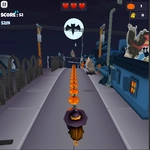
You know that moment when the music kicks in, a bat swoops past, and you're already sprinting? Halloween Runner nails that vibe without overcomplicating things. It's a side-scrolling endless runner set in a cartoonishly spooky town. You control a little runner — maybe a kid in a costume, maybe just a guy who made bad life choices — and the road ahead is littered with obstacles that want to end your run. Jack-o'-lanterns roll at you, fences block your path, and every few seconds the landscape shifts. I kept getting clipped by a low-hanging branch because I was too busy looking at the background details. The art style is playful but just eerie enough: purple skies, crooked houses, fog that actually moves.
The controls are simple arrow keys — up to jump, down to slide — but the timing gets tight fast. The game doesn't hold your hand after the first thirty seconds. You'll die, respawn, and immediately hit the ground running again because the loop is that addictive. There's no complex upgrade tree or hidden meters. Just pure reflex and pattern recognition. I found myself muttering at the screen when a ghost popped out of a barrel at the exact moment I needed to jump. It's not a horror game; it's a Halloween-themed arcade sprint that rewards stubbornness.
What surprised me was how much atmosphere matters. The sound effects are subtle — wind, crunching leaves, a distant howl. It could have been generic, but the little touches (a crow that flies off as you approach, pumpkins that crumble when you hit them) make it feel hand-crafted. If you need a quick game between classes or during a break, this one scratches that itch without demanding an hour of your time.
👥How to Play Halloween Runner
arrow buttons
✨Game Tips
Time your jumps early — some obstacles move faster than they look.
Use the slide not just for barriers, but to dodge flying objects at head height.
Don't watch your character's feet; focus on the middle of the screen for incoming hazards.
The score multiplier builds if you collect candy, but one death resets it, so play safe at first.
Memorize the repeating obstacle patterns after a few runs; the game cycles through a set sequence.
If you're on a laptop, turn off sticky keys so the arrow presses don't interrupt your run.
🔧FAQ
Q: Is Halloween Runner free to play?
A: Yes, it's completely free in your browser — no paywalls or hidden fees.
Q: Can I play Halloween Runner on my phone?
A: Yes, it works on mobile browsers, though the arrow key controls are optimized for desktop keyboards.
Q: Do I need to download anything to play?
A: No downloads or installs. Just open the page and the game starts loading immediately.
Q: What are the controls for Halloween Runner?
A: Use the up arrow key to jump and the down arrow key to slide under obstacles.
Q: How do I pause or restart the game?
A: Press the spacebar to pause, and after a game over, hit the up arrow or click the retry button to restart.
Q: Does Halloween Runner save my high score?
A: Yes, your best distance is saved automatically in your browser's local storage.