
Help Police
Play Count0
Published2023-12-06
Supported DevicesPC + Mobile
CategoryFun & Crazy
Rating★★★★★5.0Rate this game
📝Help Police Overview
Corner the thief before he slips away in Help Police — a pocket-sized brain teaser where every move either traps him or hands him an escape route.
💬What is Help Police?
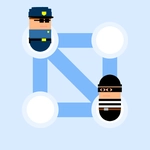
You know the feeling when a plan clicks and the whole board locks into place? That's the core rush in Help Police. You get a grid, a few cops, and one slippery thief who wants nothing more than to waltz off the edge. Click a cop, see the blue dots showing where he can move, and commit. Sounds simple, but the thief moves right after you, testing every opening. I'll confess I lost my first three rounds thinking I could just chase him down — nope. You have to cut off his routes, not follow him.
What makes it sticky is the no-takebacks tension. You can't rewind a bad move, so you're forced to read the board two or three steps ahead. Is that corner actually sealed? Did you leave a gap near the bottom row? I once boxed him in with one cop covering a narrow alley while another blocked the far exit, and when the thief froze with no moves left, I genuinely said "gotcha" out loud. The puzzles ramp up quickly, adding more cops but also more avenues for the thief to exploit. It's a small game but it scratches that tactical itch without any filler.
Visually it's clean and uncluttered — just enough detail to tell who's who, nothing distracting. The drag (or click, depending on your setup) feels responsive, and sessions are over in minutes. Perfect for when you need a mental reset between classes or during a break. It won't replace chess, but for free unblocked fun it does the job and then some.
👥How to Play Help Police
Your task is to catch the thief.
To do this, you need to arrange the police in such a way that the thief has no free moves left.
Click on the policeman to see the available moves. Click on one of the available points to make a move.
If the thief gets to t
✨Game Tips
Always check the thief's possible escapes after each cop move — don't just chase his current spot.
A cop standing still can be as useful as one moving; sometimes covering a choke point wins the round.
Look for moves that threaten two exit routes at once, forcing the thief into a narrower area.
Corners and edges are your friends — push the thief toward them and let the walls do half the work.
If you're stuck, reset and try a different cop first; the opening move often determines the whole puzzle.
Play on a touchscreen if you can — tapping a cop then a dot feels faster than mouse clicking.
🔧FAQ
Q: Is Help Police free to play?
A: Yes, the game is completely free in your browser and doesn't require any payment or account.
Q: Can I play Help Police on mobile?
A: Yes, it runs smoothly on phones and tablets through any modern mobile browser.
Q: Do I need to download anything to play Help Police?
A: No downloads or installations needed — just open the page and the game loads instantly.
Q: How do I control the police in Help Police?
A: Click or tap a cop to see available moves, then click or tap one of the highlighted dots to move him.
Q: What happens if the thief reaches the edge of the board?
A: The thief escapes and you lose the level, so you must block all exit paths before he gets there.
Q: Is there a tutorial in Help Police?
A: The first few levels act as a gentle tutorial, showing move options and the basic blocker strategy.