
HEX-A-MONG
Play Count0
Published2020-11-13
Supported DevicesPC
CategoryAction & Fighting
Rating★★★★★5.0Rate this game
📝HEX-A-MONG Overview
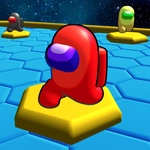
Grab a friend and fight for hexagon supremacy in this head-to-head arena where every tile you claim is one step closer to victory.
💬What is HEX-A-MONG?
HEX-A-MONG drops you and a rival onto a honeycomb grid and lets you go at it. The goal isn't just to survive—it's to swallow the board. You move around claiming hexes, and if you cut off the other guy's territory, it all flips to your color. I've had rounds turn on a single tile; one wrong step and suddenly half the map is theirs.
The controls are dead simple: WASD and Q for Player 1, Arrow keys and Space for Player 2. But don't mistake that for easy. The jump can save you or doom you—it's a quick hop that clears one tile, but mistime it and you'll land in dangerous neutral space. The tension when both players are circling the same zone is unreal. You'll find yourself blocking, feinting, and trying to predict their next move. It's like a slower, more tactical Snake with hexagons.
What keeps me coming back? The matches are short, but the mind games are deep. You can play it safe and expand slowly, or rush the middle and risk getting cut off. There's no AI opponent, so you need a real person on the same keyboard. That's a limitation, but for local multiplayer it's perfect. Pass the keyboard and settle grudges.
👥How to Play HEX-A-MONG
Controls:
Player 1
Move: WASD keys
Jump: Q
Player 2
Move: ARROW keys
Jump: Space
✨Game Tips
Claim the edge tiles first; they're harder to steal back.
Use Q or Space jump only when you're certain—a missed hop gives your opponent free territory.
Feint towards one side then double back to trap them.
If you see a gap in their wall, dive through and claim the tile behind them.
Don't spread too thin; a long chain can be broken with one well-timed jump.
🔧FAQ
Q: Is HEX-A-MONG free to play?
A: Yes, it's completely free in your browser.
Q: Can I play HEX-A-MONG on mobile?
A: The game uses keyboard controls, so it works best on desktop or laptop.
Q: Do I need to download anything to play?
A: No downloads needed—just open your browser and start playing.
Q: How many players can play at once?
A: It's strictly 2-player local multiplayer on one keyboard.
Q: What are the controls for Player 1?
A: WASD to move, Q to jump.
Q: What are the controls for Player 2?
A: Arrow keys to move, Space to jump.