
Hit Master 3D
Play Count0
Published2022-06-24
Supported DevicesPC + Mobile
CategoryAction & Fighting
Rating★★★★★5.0Rate this game
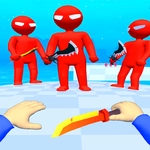
📝Hit Master 3D Overview
Tap, shoot, and clear the room before anyone gets the drop on you — this 3D shooter rewards fast fingers and faster aim.
💬What is Hit Master 3D?
Hit Master 3D drops you into a clean, simple 3D arena where the only rule is: if it moves, you hit it. The controls are basically tap-to-fire — no clunky joysticks or button mashing. You'll spot an enemy, tap on them, and watch them drop. It sounds almost too easy, but then the levels start throwing multiple targets at once and you realize the hard part isn't hitting one guy, it's deciding who to take out first before they get a shot off.
What kept me coming back is the rhythm of it. Each level feels like a mini puzzle made of timing and priority. You'll learn to sweep your thumb across the screen in short bursts, clearing corner campers before moving to the big armored guy in the back. There's a real 'aha' moment when you figure out that headshots drop enemies faster, or that you can bait a group into a line and take them down with a single rapid tap sequence. The 3D models are stylized but readable — silhouettes pop against the background, so you never lose track of a target in the heat of a firefight.
This isn't a deep tactical shooter or a story-driven adventure. It's a pure, quick-hit action game that respects your time and your reflexes. I'd call it a perfect palate cleanser between longer sessions — the kind of thing you load up for five minutes and accidentally play for forty. Just don't expect a tutorial to hold your hand; you'll learn by dying a few times, and that's half the fun.
👥How to Play Hit Master 3D
Tap To Play
✨Game Tips
Aim for headshots — they drop enemies in one tap and clear the screen way faster.
Don't just tap randomly; pick the target closest to firing at you first.
Use short, controlled swipes between targets instead of lifting your finger completely.
Corners are death traps for enemies — clear them early before advancing.
Pay attention to enemy silhouettes; bigger models often take two hits, so double-tap them.
If a level feels overwhelming, back off to a wall so enemies can only come from one direction.
🔧FAQ
Q: Is Hit Master 3D free to play?
A: Yes, it's completely free in your browser with no paywalls.
Q: Can I play Hit Master 3D on my phone?
A: Yes, it works on mobile browsers and supports touch controls.
Q: Do I need to download anything to play Hit Master 3D?
A: No download needed — it runs instantly as an HTML5 game.
Q: What are the controls for Hit Master 3D?
A: Just tap or click on enemies to shoot them; no joystick required.
Q: Is Hit Master 3D suitable for quick sessions?
A: Absolutely, each level takes under a minute, so you can jump in and out.
Q: Does Hit Master 3D save my progress?
A: The browser version typically resets, but you can replay levels anytime.