
Jewel Sliding
Play Count0
Published2022-09-01
Supported DevicesPC + Mobile
CategoryPuzzle & Thinking
Rating★★★★★5.0Rate this game
📝Jewel Sliding Overview
Slide those glimmering gems across the board and lock them into perfect lines—one wrong drag and the whole puzzle jams up tight.
💬What is Jewel Sliding?
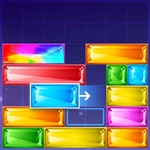
Jewel Sliding throws you straight into a board of colored gems and gives you one job: slide them until matching jewels line up and vanish. The controls are dead simple—hold the mouse button or keep your finger on the screen, drag in any direction, and the jewel glides until it hits something. What makes it tricky is that every slide counts. You can't just wiggle a gem around; once it moves, it stays, and the board slowly fills with new jewels from above. I lost a good ten minutes on a level where I kept sliding a blue gem into a dead corner because I forgot the yellow one was blocking the path. That's the hook—it's not about speed, it's about reading the board two or three moves ahead.
The difficulty ramps up quietly. Early levels let you brute-force your way through by sliding anything that moves. Then the board starts spawning locked tiles, or gems that only match in one specific direction. I found myself muttering at the screen more than once, convinced the game had handed me an unsolvable layout. It hadn't—I just wasn't paying attention. The satisfaction when a long chain of gems clears in a cascade is genuinely nice, the kind of small dopamine hit that keeps you hitting 'next' even when you said you'd stop.
Graphically, it's nothing fancy—clean colors, smooth sliding, a board that reads instantly on a phone or a desktop. No timer, no lives, no forced ads between every level. Just you, the gems, and that stubborn corner tile that won't cooperate. That's why it works as an unblocked pick-me-up: you can play for three minutes between classes or sink an hour into it without noticing.
👥How to Play Jewel Sliding
slide finger or hold mouse click
✨Game Tips
Slide slowly toward the edges—overshooting sends gems into corners you can't recover from.
Scan the whole board before your first move; one bad slide can block three possible matches.
If a gem looks stuck, check the tile next to it. Sometimes the blocker is a color you forgot about.
Prioritize clearing the bottom rows first—gems above will fall into new matches more often.
Don't chase perfect chains early on; clearing two gems now beats waiting for a five-gem cascade later.
On mobile, use short drags instead of long flicks—the touch detection is tighter that way.
🔧FAQ
Q: Is Jewel Sliding free?
A: Yes, it's totally free to play online with no hidden costs or paywalls.
Q: Can I play Jewel Sliding on mobile?
A: Yes, just open the game in your mobile browser and slide with your finger.
Q: Do I need to download anything?
A: No downloads needed. Jewel Sliding runs right in your web browser.
Q: What's the goal of Jewel Sliding?
A: Slide gems across the board to line up three or more of the same color and clear them.
Q: Is Jewel Sliding suitable for kids?
A: Absolutely, it's a family-friendly puzzle with no violence or inappropriate content.
Q: Does Jewel Sliding save my progress?
A: It depends on your browser, but most versions keep your level progress locally.