
Line Shape Puzzle
Play Count0
Published2025-05-27
Supported DevicesPC
CategoryArcade & Classic
Rating★★★★★5.0Rate this game
📝Line Shape Puzzle Overview
One line, one shape, and a clock ticking down—can you bend the line into the exact outline before time runs out?
💬What is Line Shape Puzzle?
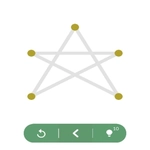
The first time I loaded Line Shape Puzzle I thought it looked almost too simple. A dark screen, a bright outline of some geometric shape, and a single bendy line waiting for you to drag it around. Then the timer starts and suddenly you're second-guessing every tiny adjustment. The game gives you a shape—maybe a triangle, maybe a wonky hexagon—and you have to stretch and bend that line until it matches the outline exactly. There's no tutorial, which I actually appreciated: just click, drag, and figure it out.
What makes it click is the precision. You can be off by a millimeter and the game won't count it. I'd spend thirty seconds nudging a corner by a pixel, convinced I'd nailed it, only to miss the target and watch the clock expire. That tension between knowing the rough shape and perfecting the angle is the whole game. Some levels feel like a relaxing brain warm-up; others had me muttering at the screen. You'll start to recognize patterns—how a three-sided outline needs two sharp bends, how a curved edge wants a gentler hand.
It's a one-sitting kind of game. No story, no upgrades, no endless menus. Just you, a line, and a shape. I kept telling myself one more level until I'd burned through twenty. The controls are dead simple: mouse click or tap to drag the line's points. But the difficulty ramps up in a way that respects your time—harder shapes need more points moved, sometimes in specific order. If you like puzzles that are more about spatial reasoning than fast reflexes, this one will eat your lunch break.
👥How to Play Line Shape Puzzle
Mouse click or tap to play
✨Game Tips
Move the big bends first—getting the overall silhouette right makes fine-tuning way easier.
Watch the target outline's corners; each sharp angle usually needs a matching fold in your line.
Don't ignore curved edges. Dragging a straight line across a curve will never match, so add a slight bend.
If you're stuck, reset the line and start from the longest side. It helps anchor the shape.
Use small mouse movements near the end; the game cares about exact alignment.
Try tapping instead of clicking when dragging on mobile—it gives you more control over points.
🔧FAQ
Q: Is Line Shape Puzzle free to play?
A: Yes, it's completely free in your browser. No paywalls or hidden fees.
Q: Can I play Line Shape Puzzle on my phone?
A: Absolutely. The tap controls work great on mobile browsers, no app needed.
Q: Do I need to download anything to start?
A: No download required. Just open the game page and play instantly.
Q: How do I drag the line?
A: Click or tap a point on the line, then drag it to reshape. Release to set.
Q: What happens if I run out of time?
A: The level restarts so you can try again. No penalties or lives lost.
Q: Is there a tutorial for Line Shape Puzzle?
A: The game skips the tutorial, but the first levels act as a soft intro. Experiment freely.