
Lumina Robot
Play Count0
Published2024-09-12
Supported DevicesPC
CategoryPuzzle & Thinking
Rating★★★★★5.0Rate this game
📝Lumina Robot Overview
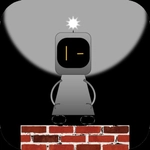
Guide a tiny glowing android through dark chambers where every beam, shadow, and mirror matters more than you'd think.
💬What is Lumina Robot?
Lumina Robot drops you into a series of dim, geometric chambers and hands you a small glowing robot that can jump and nudge light sources around. You’ll quickly learn that every switch, door, and laser grid cares about what’s illuminated — and what’s left dark. I spent my first five minutes just knocking blocks into beams to see how shadows bent, and that kind of fiddly discovery is the whole appeal.
There’s one level where you need to bounce a beam off three mirrors to hit a sensor on the ceiling, but the mirror you need is just out of reach on a high ledge. You can’t climb, so you have to use the robot’s jump to push a crate into position, then angle the mirror by bumping it. Once you line it up perfectly and that door slides open, you feel like a tiny engineer.
Controls are dead simple — WASD or arrows to move, space to jump — but the puzzles get genuinely clever later on. It’s the kind of game that’s easy to pick up between classes and hard to put down when you’re one step from the exit.
👥How to Play Lumina Robot
W,A,S,D or arrow keys to move. Space also jumps.
✨Game Tips
Use the glow trail to see where beams actually touch surfaces; shadows are more important than you think.
Push mirrors gently — a half-block nudge changes the angle more than you'd expect.
Don't panic if you fall into a pit; most levels reset instantly without losing progress.
Try jumping on top of crates to reach higher switches instead of looking for a hidden ladder.
Keep an eye on the robot's light aura; it reveals hidden pressure plates in dark corners.
🔧FAQ
Q: Is Lumina Robot free to play?
A: Yes, it runs right in your browser at no cost.
Q: Can I play Lumina Robot on mobile?
A: The game works best with a keyboard, but touch controls may be available on some sites.
Q: Do I need to download anything?
A: No downloads or plugins. Just open the page and play.
Q: What are the controls?
A: Use WASD or arrow keys to move, and spacebar to jump.
Q: Is Lumina Robot unblocked at school?
A: Usually yes, since it's an HTML5 game hosted on unblocked game sites.
Q: Does the game save my progress?
A: It saves your completed levels in your browser's local storage.