
Mandala Pages
Play Count0
Published2020-11-26
Supported DevicesPC
CategoryGirls & Lifestyle
Rating★★★★★5.0Rate this game
📝Mandala Pages Overview
Unwind with a digital coloring book full of intricate mandalas that calm your mind and sharpen your eye for color.
💬What is Mandala Pages?
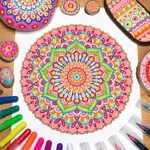
I'll admit, I clicked on this expecting something basic, but Mandala Pages hooked me for a solid twenty minutes before I even realized it. The whole setup is a no-fuss coloring page: you get a set of mandala outlines ranging from simple floral rings to seriously detailed geometric webs. Pick a color from the palette, click a region, and it fills instantly. No undo button (which is honestly part of the charm — you commit to your choices), though you can easily recolor a section if you change your mind. The colors feel rich, not washed out, and the zoom feature on the more complex designs actually works without turning everything into a pixelated mess.
What surprised me most is how tactile it feels for a mouse-only game. There's something weirdly satisfying about the precise click-click-click of filling tiny triangular gaps in a mandala's outer band. I kept zooming in to catch those little slivers I'd missed, then sitting back to see the whole pattern come together. It's like a puzzle where the only failure state is an ugly color combo — and even then, you can just slap a new shade over it. The game doesn't pressure you with timers or scores, so you're free to go full rainbow chaos or stick to a calm two-tone scheme.
Casual players will love this as a boredom killer between classes or during a slow afternoon. It's not going to challenge your reflexes, but it does reward patience and a bit of color theory intuition. I did wish for a mirror-fill tool to color matching sections simultaneously, but manually clicking each little petal has its own meditative rhythm. If you need to decompress without committing to a whole art app, Mandala Pages is a solid, browser-based escape.
👥How to Play Mandala Pages
MOUSE
✨Game Tips
Zoom in before filling tiny or overlapping regions — you'll avoid accidental color spills.
Stick to three or four colors max for a cohesive look; rainbow mandalas get muddy fast.
Use the lightest color on the innermost circlet, then darker shades as you move outward.
If a section looks wrong, don't delete — just recolor it with a closer tone from the palette.
Take a screenshot of your finished mandala; the game doesn't save your progress automatically.
The outer band has the most repetitive small shapes — start there to get into the flow.
🔧FAQ
Q: Is Mandala Pages free to play?
A: Yes, it's completely free with no hidden paywalls or premium colors.
Q: Can I play Mandala Pages on my phone or tablet?
A: It works in mobile browsers, but a mouse makes the precise clicking much easier.
Q: Do I need to download or install anything?
A: No downloads needed — just open the page in any modern web browser.
Q: Does Mandala Pages have an undo button?
A: No undo, but you can recolor any region as many times as you like.
Q: Can I save my completed mandala?
A: There's no built-in save, but you can screenshot it or use browser print to PDF.
Q: How many mandala designs are there?
A: Several unique pages, each with different levels of detail and symmetry.