
Monster Attack
Play Count0
Published2019-10-28
Supported DevicesPC
CategoryAction & Fighting
Rating★★★★★5.0Rate this game
📝Monster Attack Overview
You're not hiding from monsters here—you're throwing cars at their ugly faces and hoping something explodes before they reach you.
💬What is Monster Attack?
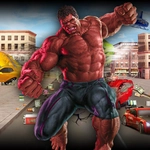
No capes, no super serum—Monster Attack drops you into a city block that's already losing a fight with something enormous. You're just a person who realized that a parked taxi makes a surprisingly good projectile. The controls feel immediate: WASD dances you around debris, left click throws a punch or fires whatever you've got, and tapping E rips a car off the asphalt so you can send it spinning into a monster's jaw. I died a few times before I learned that standing still to admire your throw is a fast way to get stomped.
The real fun starts when you unlock the special attack (X). It's a screen-clearing blast, but the cooldown punishes you for wasting it on a single grunt. You'll want to save it for when three monsters are shoulder-to-shoulder and you're cornered against a burning bus. The enemy variety keeps you honest: some lurch toward you, others spit projectiles from a distance, and the big ones take forever to bring down unless you feed them a few vehicles first. I found myself counting cars—there are only so many on each block, and when you throw the last one, you realize how exposed you actually are.
Between waves, the pause menu (Tab) is your only breather, which feels right—this isn't a game that wants you to relax. The mouse attacks add a nice rhythm: left click for quick jabs, right click for a heavier swing, and your positioning matters more than your gear. It's not a deep RPG, but as a five-minute adrenaline hit, Monster Attack overdelivers. I kept coming back just to see if I could survive one more wave than last time, and that's exactly what a good browser brawler should do.
👥How to Play Monster Attack
Controls
• WASD to move
• E to throw vehicles
• X to use special attack
• Left/right mouse clicks to attack
• Tab to toggle pause menu
✨Game Tips
Save your X special until you see at least three monsters clustered together.
Throw vehicles early and often—they deal huge damage but you can't carry them.
Keep moving in wide circles; stopping to line up a shot gets you flattened.
Right-click heavy attacks knock smaller monsters back, giving you a second to reposition.
Watch the edges of the screen for projectile-spitting enemies before they become a problem.
If you're about to die, mash Tab to pause and plan your escape route.
🔧FAQ
Q: Is Monster Attack free to play?
A: Yes, it's completely free in your browser—no downloads or hidden payments.
Q: Can I play Monster Attack on my phone?
A: The game works best with a keyboard and mouse, but many mobile browsers support touch controls.
Q: Do I need to install anything to play?
A: No installation required. Just open the game page and it runs instantly.
Q: What are the controls for Monster Attack?
A: WASD moves, E throws vehicles, X fires a special attack, and mouse buttons attack.
Q: Is Monster Attack suitable for kids?
A: It has cartoon violence against monsters but no blood or gore, so it's fine for most ages.
Q: How do I pause the game in Monster Attack?
A: Press Tab to open the pause menu and take a breather mid-fight.