
Motor Stunt Simulator 3D
Play Count0
Published2023-09-19
Supported DevicesPC
CategoryDriving & Racing
Rating★★★★★5.0Rate this game
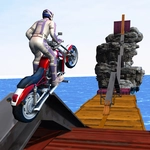
📝Motor Stunt Simulator 3D Overview
Ramp off skyscrapers, backflip over buses, and stick the landing in a stunt-packed 3D playground built for chaos.
💬What is Motor Stunt Simulator 3D?
If you've ever sent a dirt bike off a plywood ramp in real life and immediately regretted it, Motor Stunt Simulator 3D lets you do it without the hospital visit. You get a beefy motorcycle, a big open stunt park, and exactly four keys: W to gas it, S to back off, A and D to lean. That simplicity is deceptive, because the bike feels heavy and the physics actually punish you for being sloppy. I lost count of how many times I landed sideways, ragdolled across the concrete, and went straight back to the top of the ramp.
The real game starts when you're airborne. Tapping W or S mid-flight rotates the bike forward or backward, and A/D twist you left or right. Want a backflip? Hit the ramp at speed, lean back just before launch, then hold S as you rotate. Want to spin like a lunatic? Jam A or D and watch the world blur. The catch is that every trick has to end with four wheels (or two, depending on the bike) pointing down. Miss by a few degrees and you'll eat pavement. That tension between going bigger and landing clean is what kept me coming back.
There's no career mode or unlock tree here—just you, a stunt park, and a motorcycle that wants to throw you off. It's perfect for quick sessions between classes or whenever you need five minutes of dumb, joyful chaos. The 3D graphics are simple but smooth, and the camera does a nice job of following your doomed rotations. Just don't blame me when you spend an hour trying to land a triple backflip off the tallest ramp.
👥How to Play Motor Stunt Simulator 3D
W = Accelerate
S = backward
A = Steer left
D = Steer right
✨Game Tips
Feather the W key in the air to stop your rotation exactly when the wheels line up with the ground.
Approach every ramp straight on—even a slight angle sends you into an uncontrollable spin.
Hold S right after liftoff to throw the front wheel up for a backflip, then tap W to snap it back.
Don't floor it everywhere. Sometimes a slower approach gives you more control over the flip.
If you're about to land on your face, mash both A and D in the air to try a desperate barrel roll.
Use the camera to your advantage—switch views if you're struggling to judge the landing angle.
🔧FAQ
Q: Is Motor Stunt Simulator 3D free to play?
A: Yes, it's completely free in your browser. No hidden fees or microtransactions.
Q: Can I play Motor Stunt Simulator 3D on mobile?
A: It works best with a keyboard, but many mobile browsers support touch controls. Check if on-screen buttons appear.
Q: Do I need to download anything to play?
A: No download needed. It runs directly in your browser as an HTML5 game.
Q: What are the controls for Motor Stunt Simulator 3D?
A: W accelerates, S reverses or brakes, A steers left, D steers right. Use them mid-air to rotate.
Q: Is this game unblocked for school?
A: Yes, this unblocked version bypasses most school network filters. Just open the page and play.
Q: Any tips for landing big stunts?
A: Focus on leveling the bike before touchdown. A slight downward angle on the front wheel helps stick the landing.