
Ninja go
Play Count0
Published2021-03-18
Supported DevicesPC
CategoryArcade & Classic
Rating★★★★★5.0Rate this game
📝Ninja go Overview
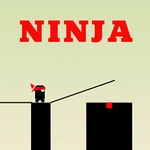
Hold to draw a stick, release to bridge the gap—if it's too short or too long, your ninja plummets into the abyss.
💬What is Ninja go?
Ninja Go is pure one-tap arcade tension. Your little ninja sprints across a series of platforms, and every gap needs a perfectly measured stick bridge. Tap and hold to grow the stick straight up, then release to let it fall. The catch? The length has to be dead-on. A hair too short and you'll watch your ninja clip the edge and tumble. A hair too long and the stick props up on the far side, leaving you to faceplant into the pit. It's absurdly simple, and that's exactly why you'll lose twenty minutes without noticing.
I remember a run where I nailed six gaps in a row and started feeling invincible. Then the seventh gap showed up, twice as wide as anything before, and I panicked—held too long, dropped a stick that could've spanned a canyon, and sent my ninja sailing past the platform into a cartoonish freefall. The sound effect alone made me laugh and immediately tap retry. The game doesn't punish you with lives or menus; you just start again, faster, because the loops are so short.
Visually it's clean and colorful, like a sticky-note sketchbook come to life. The ninja's animations are bouncy, the stick has that slight rubbery wobble as it grows, and the background shifts subtly to keep each run from feeling repetitive. Don't expect depth or story—this is a one-button reflex game for waiting rooms and procrastination. If you've got five minutes or an hour, Ninja Go will happily eat it.
👥How to Play Ninja go
tap to draw stick
✨Game Tips
Release as soon as the stick's tip hovers over the far edge—don't wait for visual confirmation.
Overshooting is worse than undershooting: a too-long stick bounces you off, a slightly short one might still catch.
Treat the first three gaps as warmups to sync your tap-hold rhythm with the stick's growth speed.
On touchscreens, keep your finger slightly below the platform so your hand doesn't block the landing zone.
Don't watch your ninja run; focus entirely on the stick's tip and the gap edge.
🔧FAQ
Is Ninja Go free to play?
Yes, Ninja Go is completely free on unblocked game sites—no paywall or premium tier.
Can I play Ninja Go on mobile?
Absolutely. The tap-to-draw controls work perfectly on touchscreens, and it runs in any modern mobile browser.
Do I need to download anything for Ninja Go?
No downloads. It's an HTML5 game that loads instantly in your browser.
Is Ninja Go suitable for kids?
Yes, there's no violence or gore—just a cartoon ninja falling into pits, which is more funny than scary.
What happens if my stick is too long?
The stick will overshoot the far edge, your ninja will miss the platform, and you'll have to retry from the last checkpoint.
How do I restart a run in Ninja Go?
Simply tap the retry button that appears after a fall, or refresh the page if you want a full reset.