
Number Bee
Play Count0
Published2026-04-08
Supported DevicesPC + Mobile
CategoryArcade & Classic
Rating★★★★★5.0Rate this game
📝Number Bee Overview
Bees are buzzing, equations keep popping, and your brain better be fast — how many can you solve before the hive swarms?
💬What is Number Bee?
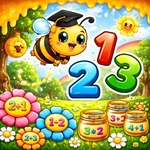
Number Bee drops you into a cheerful little garden where a striped bee hovers beside a math problem. Four answer buttons sit below, each with a number. You click the right one, the bee does a happy loop, and the next problem pops up. Get it wrong and there's a brief, not-too-cruel buzz that signals your mistake. The whole thing moves fast — not stressful fast, but enough that you'll feel the pressure when the timer starts ticking or the score multiplier builds. I kept messing up on 7 x 8 for a solid minute, which is embarrassing because I'm an adult.
What makes it work is the snappy feedback. No loading screens, no menus to click through. The core loop is pure: read the equation, scan the options, pick the correct one. The keyboard controls (1 through 4) are a nice touch if you don't want to mouse over, and on mobile you just tap. The art style is bright but not saccharine — the bee has a little personality with its bobbing animation, and the numbers are easy to read. It's clearly aimed at younger players or anyone who wants a quick mental warm-up, but I found myself chasing a higher score without realizing twenty minutes had gone by.
There isn't a deep progression system or unlockable skins here. It's a straightforward math drill wrapped in a friendly arcade shell. That's not a criticism — sometimes you just want a game that loads instantly and makes you think. Number Bee delivers exactly that. If you've got a kid practicing multiplication tables or you just want to sharpen your own arithmetic, this is a solid pick for a five-minute break.
👥How to Play Number Bee
MOUSE: Click answers to select. KEYBOARD: Number keys 1–4 to pick answers. Mobile: Tap to interact.
✨Game Tips
Use the number keys instead of clicking once you get the rhythm down.
Glance at all four options before deciding — sometimes the obvious answer is a trap.
Focus on accuracy first; speed comes naturally after a few rounds.
Keep your thumbs near the lower answer slots when playing on a touchscreen.
If a question stumps you, eliminate obviously wrong answers first.
The bee's little victory loop is a good timing cue for the next problem.
🔧FAQ
Q: Is Number Bee free to play?
A: Yes, it's completely free in your browser with no paywalls or subscriptions.
Q: Can I play Number Bee on my phone?
A: Absolutely, the tap controls work smoothly on mobile browsers and tablets.
Q: Do I need to download anything to play?
A: No downloads needed, just open the game page and it runs instantly.
Q: What kind of math does Number Bee use?
A: Basic arithmetic like addition, subtraction, multiplication, and division.
Q: Is Number Bee good for kids?
A: Yes, it's designed to be kid-friendly with bright colors and simple controls.
Q: How do I use the keyboard controls?
A: Press the number keys 1 through 4 to select the corresponding answer.