
Offroad Vehicle Explorer
Play Count0
Published2021-03-04
Supported DevicesPC
CategoryDriving & Racing
Rating★★★★★5.0Rate this game
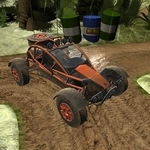
📝Offroad Vehicle Explorer Overview
Mud pits, steep climbs, and a stubborn 4x4 that actually feels heavy — this is off-roading without the tow truck.
💬What is Offroad Vehicle Explorer?
Offroad Vehicle Explorer drops you behind the wheel of a burly 4x4 with one job: get from point A to point B without rolling down a ravine. The terrain isn't gentle. Deep ruts, loose gravel, boulder fields, and muddy slopes all fight back in a way that feels surprisingly physical for a browser game. You're not just holding W and hoping—every rock has weight, every incline demands a decision. I found myself leaning into the screen on a near-vertical climb, convinced the truck was about to tip backward.
What sets it apart is the way the suspension actually works. Hit a bump too fast and the chassis bucks; crawl over a ledge at an angle and one wheel lifts off the ground. The damage model isn't punishing, but momentum is. Take a corner too hard on a ridge and you'll slide sideways, then tumble. I once spent five minutes trying to crest a hill by flooring it, only to realize that a slower, steady throttle with the front wheels slightly turned was the way up. That's the loop—testing angles, fighting traction, and occasionally hitting G to reset after a bad flip.
Controls are simple: WASD to drive, space to brake, and G to reset the car. No upgrades, no boost pads, no drift points. Just you, the landscape, and a truck that behaves like a truck. If you enjoy games where the road is the enemy, this one will eat an afternoon.
👥How to Play Offroad Vehicle Explorer
Tab - menu
Space - Brake
WASD - Drive
G - Reset car
✨Game Tips
Brake with space before steep descents—locking wheels on loose dirt can whip you sideways.
When stuck in mud, tap W gently instead of holding it; spinning tires only dig deeper.
Use G immediately after a flip. It resets the car faster than waiting or trying to self-recover.
Approach hills straight-on, not at an angle, to avoid rolling sideways on a steep face.
Rocky sections are easier at low throttle—let the suspension do the work.
🔧FAQ
Q: Is Offroad Vehicle Explorer free to play?
A: Yes, it's completely free in your browser with no hidden paywalls.
Q: Can I play Offroad Vehicle Explorer on mobile?
A: It works on mobile browsers, but a keyboard is recommended for precise throttle and braking.
Q: Do I need to download anything?
A: No downloads or plugins required. It runs directly in any modern web browser.
Q: What are the controls for Offroad Vehicle Explorer?
A: Use WASD to drive, space to brake, and G to reset your vehicle after a crash.
Q: Is there a multiplayer mode?
A: No, this is a single-player off-road driving experience. You explore alone.
Q: Does Offroad Vehicle Explorer work on school Chromebooks?
A: Yes, as long as your school network allows the site, it runs fine on Chromebook browsers.