
Park The Police Car
Play Count0
Published2021-05-13
Supported DevicesPC
CategorySkill & Precision
Rating★★★★★5.0Rate this game
📝Park The Police Car Overview
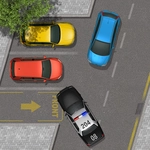
Slide behind the wheel of a cop car, navigate tight corners, and prove you can park it perfectly without a single scratch.
💬What is Park The Police Car?
Parking a police cruiser isn't the same as easing your family sedan into a grocery store spot. The thing is long, wide, and it turns like a boat. I found that out the hard way when I tried to swing into a perpendicular space and ended up with my front bumper kissing a concrete barrier. That was level one.
The game keeps it simple: drive the cop car into the glowing parking zone without hitting anything. Sounds easy until you realize the camera angle can hide your rear end, and the car's turning circle is generous in all the wrong ways. Each level adds more obstacles—cones, other cars, tight alleys—and the margin for error shrinks. On desktop, the arrow keys or WASD feel okay, but I'd recommend tapping rather than holding to get finer control. On mobile, the on-screen buttons are serviceable but a bit twitchy; I often oversteer when trying to make small adjustments.
What kept me coming back was the frustration loop. You clip a cone by a pixel, the level resets, and you immediately try again because you know exactly what to fix. There's no timer, no score chasing—just you versus the geometry and your own impatience. If you're the type who enjoys backing a trailer in real life (or just likes proving you can parallel park under pressure), this one scratches that itch. Don't expect sirens or high-speed chases; this is a pure parking puzzle wrapped in a police livery.
Oh, and one more thing: the car doesn't have a reverse camera, so you'll need to actually use your mirrors... metaphorically. Good luck.
👥How to Play Park The Police Car
Desktop: Arrow keys or W,A,S,D to drive the car.
Mobile: Use on-screen buttons to drive.
✨Game Tips
Ease off the gas when you're close—short taps beat holding the key down.
Line up your approach before entering the spot; sharp corrections late will send you into cones.
Watch the front tires, not the hood, to judge how the car is turning.
Mobile controls are touchy, so use the very edge of the button for smaller inputs.
If you're stuck on a level, park at an angle first, then straighten out in small increments.
The car's turning radius is wide—start your turn earlier than feels natural.
🔧FAQ
Q: Is Park The Police Car free to play?
A: Yes, it's completely free to play online with no hidden charges.
Q: Can I play Park The Police Car on my phone or tablet?
A: Yes, the game supports mobile browsers with on-screen touch controls.
Q: Do I need to download anything to start playing?
A: No downloads needed. It runs directly in your web browser as an HTML5 game.
Q: What are the controls for Park The Police Car?
A: Desktop: arrow keys or WASD. Mobile: use the on-screen buttons to steer and drive.
Q: Is this game suitable for younger players?
A: Absolutely, it's a family-friendly parking challenge with no violence or mature content.
Q: Why won't the car move when I press the keys?
A: Click on the game area first to give it keyboard focus, then try again.