
Parking Challenge
Play Count0
Published2023-01-19
Supported DevicesPC + Mobile
CategoryArcade & Classic
Rating★★★★★5.0Rate this game
📝Parking Challenge Overview
Think you can parallel park under pressure? Squeeze into impossibly tight spots without scraping the paint while the clock ticks down.
💬What is Parking Challenge?
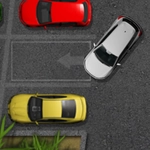
I've wasted enough hours on parking sims to know most of them feel like driving a bar of soap. Parking Challenge isn't one of those. The second you tap the gas, you feel the weight of the car shift — and that's exactly where the trouble starts. You're steering with arrow keys or on-screen buttons, nudging a surprisingly touchy sedan into painted rectangles squeezed between concrete barriers, other cars, and the occasional traffic cone that seems placed purely to humble you.
The early levels lull you into confidence. Wide open spaces, generous spots, no timer. Then the game throws a parallel park between two trucks with maybe six inches of clearance, and suddenly your palms go sweaty. I genuinely held my breath on a later stage where a single pixel of contact means instant fail. The collision detection is strict — not unfair, but strict. One thing I noticed: the car's rear swings wider than you expect when reversing, so you learn to watch the side mirrors (well, the sprite's edges) instead of aiming the nose at the spot.
It's a straightforward arcade take on parking, no unlockable cars or story mode, which honestly works in its favor. You jump in, fail a bunch, finally nail the angle, and feel like a hero for about four seconds before the next level humbles you again. Keyboard controls are my preference, but the touch buttons are big enough that mobile play doesn't feel like a compromise. If you like games that reward patience and precision over speed, this one's a solid pick. Just don't expect to finish it on your lunch break without at least one rage quit.
👥How to Play Parking Challenge
Use arrow keys or on screen buttons to drive.
✨Game Tips
Tap the acceleration lightly instead of holding it — short bursts give you way more control in tight corners.
Reverse slowly and watch the rear of the car; that's what clips obstacles most often.
Use the painted lines as a guide: line up your side mirror (or door edge) with the front line of the spot.
If you're on keyboard, feather the left/right keys rather than mashing them to avoid oversteering.
Some levels don't have a timer, so use that freedom to reposition as many times as you need.
When parallel parking, cut the wheel fully once your rear wheel passes the front car's bumper.
🔧FAQ
Q: Is Parking Challenge free to play?
A: Yes, it's completely free in your browser with no payment needed.
Q: Do I need to download anything to play Parking Challenge?
A: No downloads required. It runs in any modern browser as an HTML5 game.
Q: Can I play Parking Challenge on my phone?
A: Yes, the game includes on-screen buttons for touchscreens, so mobile works fine.
Q: What are the controls for Parking Challenge?
A: Use arrow keys on a keyboard or the on-screen buttons to steer, accelerate, and reverse.
Q: Is Parking Challenge unblocked at school?
A: Usually yes, since it's a browser game without installs. Check your school's site restrictions.
Q: How many levels does Parking Challenge have?
A: The level count varies, but you can expect dozens of increasingly tricky parking spots.