
Parking Expert: Driving Exam
Play Count0
Published2026-01-22
Supported DevicesPC + Mobile
CategoryDriving & Racing
Rating★★★★★5.0Rate this game
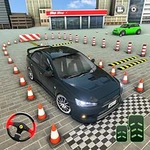
📝Parking Expert: Driving Exam Overview
Thread a sedan through cones, reverse into tight spots, and prove you've got the patience for a perfect parallel park.
💬What is Parking Expert: Driving Exam?
There's a special kind of tension when you're inches from a concrete pillar, holding your breath, tapping the brake. Parking Expert: Driving Exam throws you into a series of parking challenges that feel less like a game and more like a certified test of patience. You get a car, a cramped lot, and a set of cones or painted lines that seem designed to humiliate you. The controls are straightforward — WASD on a keyboard, or touch pedals and a virtual steering wheel on a phone — but the real challenge is not smashing into things at 2 mph.
I'll admit I scraped a few virtual bumpers early on. The learning curve sneaks up on you: the first few spots are almost insultingly simple, then suddenly you're parallel parking between two SUVs with about six inches of clearance on either side. I spent ten attempts on one level just figuring out the correct entry angle, and when I finally slid in without touching a line, I actually exhaled like I'd been holding my breath for real. The physics feel weighty — the car doesn't pivot like a toy, and the turn radius actually matters. You can't just floor it and hope; you have to feather the throttle, watch your mirrors, and sometimes accept a three-point turn as a small victory.
What keeps me coming back is that the game doesn't hold your hand. No arrows on the ground, no ghost car showing the line. Just you, a steering wheel, and a stubborn refusal to hit the reset button. It's oddly meditative once you stop panicking. And honestly, after a few levels, you start judging real drivers in parking lots. If you've ever wanted to prove you could pass a driving exam without leaving your chair, this is the game for you.
👥How to Play Parking Expert: Driving Exam
PC
W — Accelerate
S — Brake / Reverse
A — Steer left
D — Steer right
Smartphone / Tablet
Tap and hold the right pedal — Accelerate
Tap and hold the left pedal — Brake / Reverse
Use your finger to turn the steering whee
✨Game Tips
Feather the brake instead of flooring it — momentum kills precision.
Approach angled spots a bit wider than you think; cutting in too early forces a three-point correction.
On touchscreens, keep your thumb low on the steering wheel for finer movements.
Reverse parking? Watch the rear bumper in the mirror, not the front of the car.
If you clip a cone, don't restart immediately — finish the attempt to learn the car's turning radius.
Use the brake to stop completely before switching from reverse to drive; it prevents sudden jerks.
🔧FAQ
Q: Is Parking Expert: Driving Exam free to play?
A: Yes, it's completely free in your browser with no hidden fees.
Q: Can I play Parking Expert: Driving Exam on mobile?
A: Yes, the touch controls work on smartphones and tablets.
Q: Do I need to download anything to play?
A: No, it runs directly in your browser as an HTML5 game.
Q: Is Parking Expert: Driving Exam suitable for beginners?
A: Absolutely, the early levels teach basic steering and braking before harder parking spots.
Q: How hard is Parking Expert: Driving Exam?
A: It starts easy but later levels require precise throttle control and spatial awareness.
Q: Can I play Parking Expert: Driving Exam offline?
A: You need an internet connection to load the game, but it plays smoothly once loaded.